|
|
|
|
|
ActiveX
Controls
for Enterprise
Application Design |
| |
|
|
|
|
|
|
|
|
|
|
|
  |
|
|
|
|
|
|
|
|
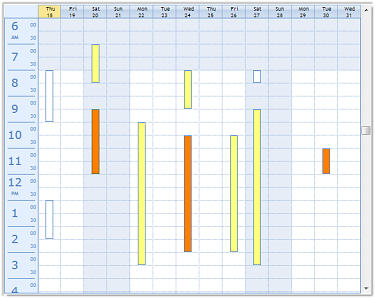
ctWeek - is a planner ActiveX component
that allows end users to view one or
more days worth of activities at a
glance. End-users may view appointments
for up to 31 days at a time. Weekends
and prime-time hours can be accented.
The start and end times that are
displayed for a week may be set. Time
can be displayed in either standard or
military time. |
|
| |
|
|
| |
|
|
| |
 |
|
| |
|
|
| |
|
|
| |
Flexible Presentation Options
: Independent color properties
for "prime-time" and "non-prime-time"
background colors and times. Specific
lines may be colored independently. |
|
| |
|
|
| |
Modern Windows UI Design
: The background of the header
and time area can all be colored with
different styles and themes. |
|
| |
|
|
| |
Time Select Event :
The TimeSelect event is triggered when
time cells are selected and highlighted.
Parameters include the starting date /
time of selected area and the ending
date / time of the selected area. |
|
| |
|
|
| |
BarOver Event : The
BarOver event is triggered when the
mouse pointer is moved over a time bar.
The event reports the identifying index
value of a time bar. |
|
| |
|
|
| |
Managing Appointments
: A host of custom methods allow
developers to quickly code the adding,
deleting, and moving of time bars within
the ctWeek component. Additionally,
ctWeek includes methods to clear all
appointments or column color block
information from the display. |
|
|
|
|
| |
|
|
| |
|
|
|
|
| |
|
|
|
|
| |
|
|
|
|
| |
 |
|
| |
|
|
|
|
| |
|
|
|
|
| |
|
|
|
|