|
|
|
| |
Three WPF Scheduling
Controls in one! |
|
| |
|
|
| |
DBI Calendar WPF - Comprised of three full featured controls wrapped
into one. A comprehensive product for .NET
developers offering an integrated Day View, Week View and
Month View component features, perfect for adding scheduling
functionality in any WPF application. |
|
| |
|
|
| |
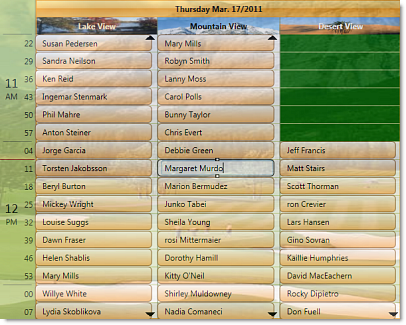
The following presentation demonstrates the flexibility built into
DBI's award winning scheduling controls. The Multi
Column View of dbiCalendarWPF for instance may be
configured to accommodate appointment intervals from
one minute through to 60 minutes and values
in between - think of your tee times, dentist
appointments and chiropractor appointments for
example. |
|
| |
|
|
| |
|
|
| |
|
|
| |
dbiCalendarWPF is designed for direct appointment
entry! |
|
| |
Simply click on a time slot and
start typing. |
|
| |
|
|
| |
 |
|
| |
View Options Demo |
|
| |
|
|
| |
With the click of a Right mouse
button toggle between Date, Contact, Location
or Task. |
|
| |
|
|
| |
dbiCalendarWPF does away with the need for a
dialogue for entering appointment information.
An appointment dialogue and a sample project are included should
one need to be implemented. |
|
| |
|
|
| |
The built-in context menu, or a
custom context menu, enhances the direct entry
nature of dbiCalendarWPF. With a simple right mouse
click appointments can be modified, calendar views
adjusted and sorting criteria changed. |
|
|
|
|
| |
Modify the
properties of an appointment using built-in context
menus. Add / Edit appointments, Contacts, Locations
and Tasks without ever seeing an edit dialogue. |
|
| |
|
|
| |
Multi Column Day View |
|
| |
 |
|
| |
Calendar Views with Drag N Drop Demo |
|
| |
|
|
| |
Access the properties of the
control through the built-in context menus for
Grouping and Sorting by Day, Week, Month and by
Custom areas in the control. |
|
|
|
|
| |
Week View |
|
| |
 |
|
| |
Week view with Drag N Drop Demo |
|
| |
|
|
|
Life doesn't happen in nice
even 15, 30 or 60 minute intervals. Life happens
around the clock in any combination and permutation
of time. Onsite service personnel are scheduled when
they're needed, Golf Course Tee Time
scheduling typically happens on 7 minute intervals
and components of a dentist appointment may range
from 2 minutes to 75 minutes. |
|
|
|
|
| |
 |
|
| |
view online
golf scheduling demo |
|
| |
|
|
| |
|
|
| |
Enhance your User's
Scheduling Experience with direct modification of
appointment properties using dbiCalendarWPF's
built-in context menus. Add / Edit appointments,
Contacts, Locations and Tasks without ever seeing an
edit dialogue. |
|
| |
|
|