|
|
Enterprise
Application Design
&
Scheduling
|
|
|
|
|
|
Studio Controls
for
.NET
- dbiTips  |
| |
|
|
|
|
dbiTips is a fully
customizable tool tip control offering an additional
communication medium for Windows application developers. Impart contextual
information in creative and visually
appealing designs using built-in and
User Drawn functionality.
|
|
|
|
|
|
|
|
|
|
|
|
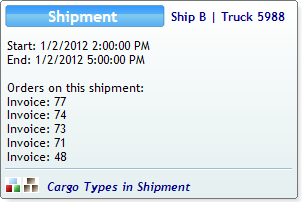
dbiTips has been designed with three
discrete programmatic segments:
• Header / Title
• Body
• Footer
Each segment may contain any combination
of text and / or image and surfaced as per the
application design requirement. |
|
 |
| |
| |
| |
| |
| |
| |
| |
| |
| |
|
|
|
|
|
|
|
|
Extend any tooltip compatible component
on a form with the functionality of
dbiTips. dbiTips can automatically
extend any component on a form by adding
a "dbiTipsText on dbiTips" property to a
tooltip compatible component.
|
|
|
|
|
|
|
|
|
|
|
|
|
 |
|
> Add multi-line
text to your tips presentations with
ease giving end users quick, poignant
access to data-related information. |
|
|
|
|
|
|
|
|
|
|
|
|
> Create unique
tooltip presentations using dbiTips'
masked tooltip functionality. Irregular
shaped tooltips are a snap to create. |
|
|
|
|
|
|
|
|
|
|
|
|
|
|
|
|
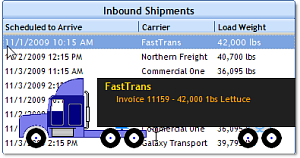
Integrate dbiTips with complex controls
such as
dbiDayView or
dbiSchedule for instance offering
quick, direct contextual presentation of
key data elements sourced from your
application data. |
|
|
|
|
|
|
|
|
 |
|
|
|
|
|
|
|
|
>
Integrating dbiTips with other
controls is simplified through
the 'Set dbiTips Text' Method
extending programmatic control
for setting and attaching a
control to the dbiTips Body Text
at run-time. |
|
>
dbiTips incorporates a Show
Method (and 12 overloads)
providing developers pin point
detail of form interaction down
to the 5-W's: where, what,
when, who and why. |
|
|
|
|
|
|
|
|
|
|
|
|
|
|
Enhance your application design and
corporate branding standards with
dbiTips and get the best bang for your
development dollar. |
|
|
|
|
|
|
|
|
|
|
|
|
|
|
|
|
|
| |
|
|
|
|