


The DbicCalc control operates similarly to the standard calculator found in the Windows TM operating system. The standard keyboard has 22 fixed keys, 0-9, . (Decimal point), +/- (convert from positive to negative), + (Add), - (Subtract), * (Multiply), / (Divide), = (Equals), 1/x (Reciprical/Inverse), % (Percent), sqrt (Square Root), C (Clear), and Back (back to the previous keypress).
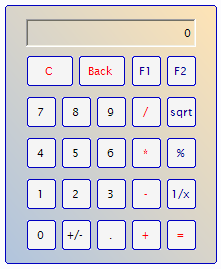
The control also supports two optional function buttons (by default F1 and F2) that can be optionally displayed and programmed (please see Adding Custom Functions).
In addition to being a mouse-driven interface, the control supports the following keyboard shortcuts …
Key Button
0 0
1 1
2 2
3 3
4 4
5 5
6 6
7 7
8 8
9 9
. .
+ +
Enter =
- -
* *
/ /
C C
c C
Backspace Back
NOTE: There are no shortcut equivalents for the +/-, 1/x, %, sqrt, sq and F1 or F2 buttons.