


Databinding in dbicCalendar
The dbicCalendar control encapsulates collections, methods, events, and properties that allow the developer to bind the control to virtually any data source containing collaboration data, i.e. appointments, contacts, locations, and tasks. At its heart, the dbicCalendar control presents appointment information and provides a platform for a user to visually interact with that information. The dbicCalendar control manages 4 collections internally:
1. Appointments
2. Contacts
3. Locations
4. Tasks
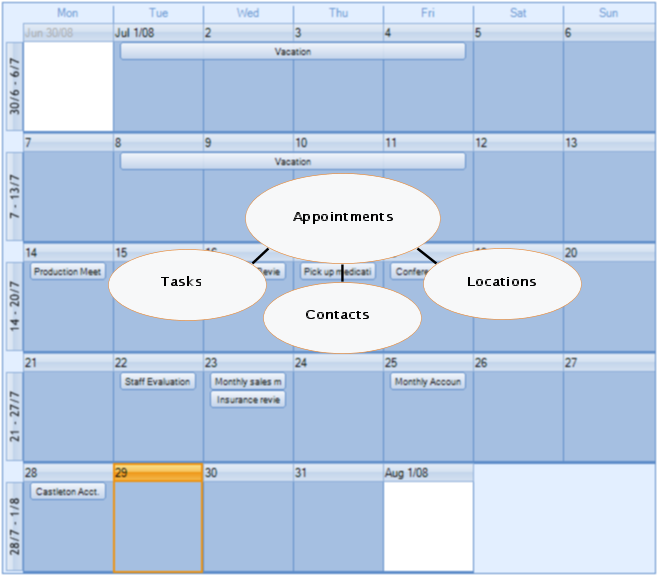
The collections in the dbicCalendar control mirror the objects required to build a collaboration database, i.e. a database to store appointment and appointment-related data.
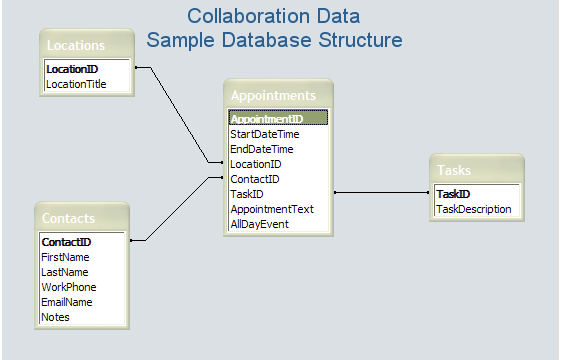
The sample database structure above illustrates the four main objects necessary to describe the data for a collaboration (appointment scheduling) application. It is important to note that each table has an "ID" field to uniquely identify each record in the table. The dbicCalendar control collections have a related "EntryID" field in which the appropriate table "ID" value is stored to uniquely identify and relate the objects in the control.
IMPORTANT: The sample database described above is a relatively simple example of a database structure that could be used for a collaboration application. The structure and storage methodologies for each application is different and completely developer dependent.
ADO.NET is set of software components that can be used by programmers to access data and data services. ADO.NET is a part of the base class library that is included with the Microsoft .NET™ Framework. It is commonly used by programmers to access and modify data stored in relational database systems, though it can also be used to access data in non-relational sources. Using the ADO.NET classes, the developer can directly connect and persist the dbicCalendar collections with their related database objects.
ADO.NET consists of two primary parts; a Data Provider and a DataSet (DataTables). The Data Provider classes provide access to a data source such as Microsoft SQL Server, an Oracle database, and an OLEDB data provider for connecting to an Access database or other OLEDB compliant data source. The data source includes a set of common utility classes:
- Connection: Provides a connection used to communicate with the data source. Also acts as an abstract factory for command objects.
- Command: Used to perform some action on the data source, such as reading, updating, or deleting relational data.
- Parameter: Describes a single parameter to a command. A common example is a parameter to a stored procedure.
- DataAdapter: A bridge used to transfer data between a data source and a DataSet object (see below).
- DataReader: Used to efficiently process a large list of results one record at a time. It allows records to be accessed in a read-only, forward-only mode, i.e., records have to be accessed in sequential order; they can neither be randomly accessed nor can a record which has been processed previously be accessed again.
DataSet objects are a group of classes describing an in-memory relational database. The DataSet object represents a schema (either an entire database or a subset of one) that contains tables and relationships between those tables. A DataTable object represents a single table in the database. It has a name, rows, and columns.
NOTE: Prior to Visual Studio 2005™ DataTables were only accessible through a DataSet container. In Visual Studio 2005™ the DataTable object was made available for direct connection to a database without the requirement of the higher level abstraction of a DataSet to contain it. For simple databases direct connection through a DataTable object is sufficient.
To connect the simple Collaboration Data Structure noted above to the dbicCalendar control the following ADO.NET objects are required …
- OLEDB connection object used to communicate with the data source. NOTE: Only one connection is required per data source.
- OleDbDataAdapter objects, one for each DataTable. Persists the data between the DataTable in memory and physical database on disk.
- DataTable objects, one for each physical table in the database. Represents the physical table in memory. NOTE: Each DataTable consists of DataRow objects, each DataRow representing one record in the physical table in the database.
The following diagram illustrates the relationships between the physical database, the ADO.NET objects, and the collections in the control.
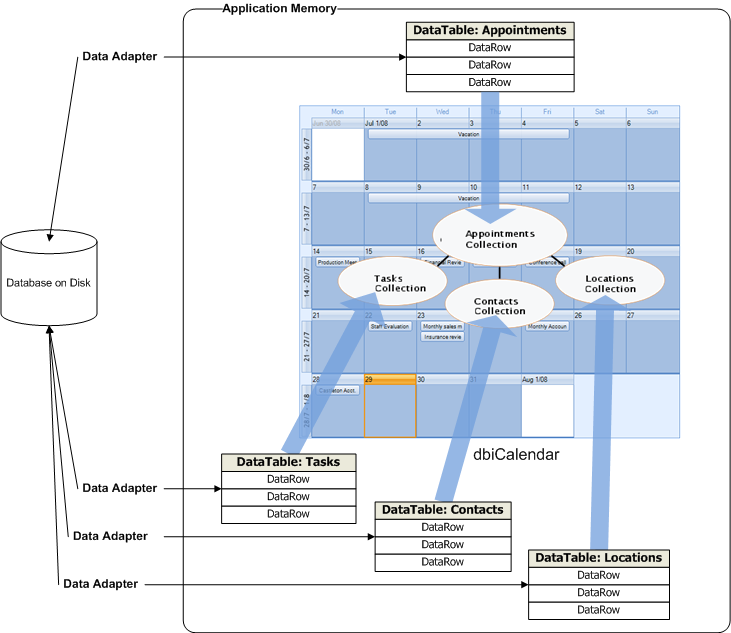
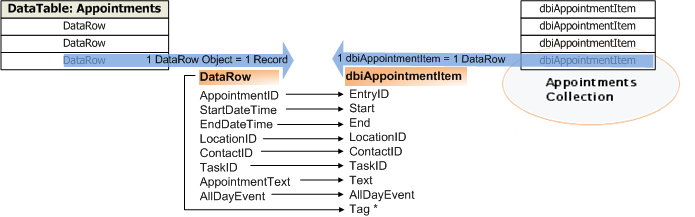
An important advantage of using the ADO.NET architecture is its “object” approach to data management. The following diagram illustrates the detailed relationship between the Appointments DataTable rows (representing the records in the physical database) and the dbicCalendar Appointments collection dbiAppointmentItems. The mapping of the columns in the DataRow are one-to-one with the properties of the dbiAppointmentItem objects. NOTE: The Tag property in the dbiAppointmentItem is used to store the DataRow object that the dbiAppointmentItem is representing. This feature is extremely useful for updating the database in response to changes in the data (see below).
The issue of binding the dbicCalendar control to a data source requires a basic understanding of the three phases of data binding;
- Connecting to the data source.
- Reading the data from the data source.
- Responding to changes in the data.
SPECIAL NOTE: The dbicCalendar control is also capable of loading and saving data in the form of XML files. For more information on using XML and the dbicCalendar control please refer to the XML Support section of the help file accompanying the control.
Connecting to the data source
IMPORTANT: The following discussion is only one methodology for connecting a database to the dbicCalendar control.
PLEASE NOTE: The format and storage architecture for appointment information is completely developer dependent/control independent. There are many database architectures in use today, including SQL Server, Access, ORACLE, dBase, Sybase, Interbase, DB2, Informix, MySQL, and many others. The dbicCalendar control is not dependent on any database architecture, but rather the developer's ability to create a connection to the database from which they can read and write data.
The dbicCalendar data binding sample application illustrates the use of an ADO.NET connection to an Access 2007 database.
To create the in-memory representation of the database requires the following steps:
- Create a connection to the database.
- Create a DataAdapter for each table in the database using the connection and a command to select the appropriate records from the database.
- Create a DataTable for each table in the database.
- Fill each DataTable using the appropriate DataAdapter.
- Create the Insert, Update, and Delete commands for tables requiring those actions.
NOTE: When connecting to the data source it is good practice to create the Update and Delete commands to manage those actions in the database. For simple tables the Data Command Builder (OleDb.OleDbCommandBuilder)can be used. For more complex SELECT statements - or simply where more control over what's going on is required then it is recommended each of the Command properties in the DataAdapter be coded directly.
Once the database has been established in memory the DataRows can be read into the appropriate collections.
Reading the Data from the Data Source
PLEASE NOTE: If your Appointment information does not contain Tasks, Contacts, and/or Locations, loading of those collections is not necessary.
Loading the Contacts collection
The following code sample illustrates the population of the dbicCalendar control's Contact collection using a DataTable object .
NOTE: The Contact Item is inherited from the dbiPIM assembly, its properties are set from the Contact table DataRow (record), and then assigned to the dbicCalendar Contacts collection.
NOTE: In the follow code sample the ContactID field in the Contacts table stores the unique value by which each contact is described. This is the relational value in the database used to relate an appointment to a contact. The ContactID from the appointments table is stored in the RecordID (integer value) and EntryID (string value) properties of the Contact collection object. When describing an appointment in the dbicCalendar control, the appointment ContactID property describes the appropriate Contact collection object's EntryID. This is how an appointment in the control is related to a contact in the contacts collection. This allows for the quick retrieval of the contact information when inspecting an appointment.
<VB.NET Sample>
'Loads the contacts from the database into the contacts collection of the dbicCalendar control
'Clear the Contacts collection in the dbicCalendar control
Me.dbicCalendar1.Contacts.Clear()
'Iterate through the rows in the Contacts Data Table
Dim currentRow As DataRow
For Each currentRow In dtContacts.Rows
'Create a new Contacts collection object
Dim dvContact As New Dbi.PIM.dbiContactItem'Set the properties of the Contacts collection object
dvContact.LastName = currentRow("LastName")
dvContact.FirstName = currentRow("FirstName")
dvContact.RecordID = currentRow("ContactID")
dvContact.EntryID = currentRow("ContactID")‘Set the Title to the LastName, FirstName (used when grouping and filtering)
dvContact.Title = currentRow("LastName") & ", " & currentRow("FirstName")'Add the contact to the dbicCalendar control's Contacts Collection
Me.dbicCalendar 1.Contacts.Add(dvContact)
Next
<C# Sample>
//Loads the contacts from the database into the contacts collection of the dbicCalendar control
//Clear the Contacts collection in the dbicCalendar control
this.dbicCalendar1.Contacts.Clear();
//Iterate through the rows in the Contacts Data Table
foreach (DataRow currentRow in DataBinding.dtContacts.Rows)
{
//Create a new Contacts collection object
Dbi.PIM.dbiContactItem dvContact = new Dbi.PIM.dbiContactItem();
//Set the properties of the Contacts collection object
dvContact.LastName = (string)currentRow["LastName"];
dvContact.FirstName = (string)currentRow["FirstName"];
//Concatenate the Last Name and First Name in the Title for use in the Contacts Combo Box in the Appointment Dialog.
dvContact.Title = currentRow["LastName"] + ", " + currentRow["FirstName"];
dvContact.RecordID = (int)currentRow["ContactID"];
dvContact.EntryID = currentRow["ContactID"].ToString();
//NOTE: The ContactID field in the Contacts table stores the unique value by which each contact is described.
// This is the relational value in the database used to relate an appointment to a contact.
// The ContactID from the appointments table is stored in the RecordID (integer value) and EntryID (string value) properties of the Contact collection object.
// When describing an appointment in the dbicCalendar control, the appointment.ContactID property describes the appropriate
// Contact collection object's EntryID. This is how an appointment in the control is related to a contact in the contacts collection.
// This allows for the quick retrieval of the contact information when inspecting an appointment.
// NOTE: The dbicCalendar control will display the name of the contact in an appointment by looking up
// the appropriate contact in the dbicCalendar's Contacts collection using the appointment's ContactID
// value and comparing it to the EntryID values in the Contacts collection.
this.dbicCalendar1.Contacts.Add(dvContact); //Add the contact to the dbicCalendar control's Contacts Collection
}
It is important to note that the Contact Collection Item (dvContact above) EntryID property is set to the ContactID field value in the Contacts table record. As with a database, the Contacts collection in the control requires the developer to uniquely identify each contact with an ID value. This value is used to connect a Contact to one or many Appointments in the control. Similarly, the Locations and Tasks collections have EntryID properties for each item. These EntryID values are used to connect Locations and Tasks to Appointments using an Appointment's LocationID and TaskID properties.
The above procedure can be repeated for Locations and Tasks.
Loading the Appointments collection
The following code sample illustrates the population of the dbicCalendar control's Appointments collection using a DataTable object .
NOTE: The Appointment Item is inherited from the dbiPIM assembly, its properties are set from the Appointments table DataRow (record), and then the dbiAppointmentItem is added to the dbicCalendar Appointments collection.
<VB.NET Sample>
Private Sub LoadAppointments(ByVal dtDate2LoadStart As DateTime, ByVal dtDate2LoadEnd As DateTime)
'Reads the appointments from the appointments table in the database into the dbicCalendar control
Try
'Create a filter on the data table to show only those appointments between the start
'and end dates passed in as parameters in the call to LoadAppointments.
Dim filterAppointments() As DataRow
Dim stringFilter As String
stringFilter = "StartDateTime >= '" & dtDate2LoadStart.ToString("MM.dd.yyyy") & "' "
stringFilter = stringFilter & "AND StartDateTime <= '" & dtDate2LoadEnd.Date.ToString("MM.dd.yyyy") & "'"
'Sets the filter on the data table.
'NOTE: The Select method on the table returns only those rows that match the filter criteria.
'The rows are stored in a strongly typed array of rows called filterAppointments.
filterAppointments = dtAppointments.Select(stringFilter)
'Iterate through the strongly typed array of rows to create the appointments in the dbicCalendar control
Dim currRow As DataRow
For Each currRow In filterAppointments
'create a new appointments collection appointment object
Dim dvAppointment As New Dbi.PIM.dbiAppointmentItem
'Set the properties of the appointment item object
dvAppointment.Start = currRow("StartDateTime")
dvAppointment.End = currRow("EndDateTime")
dvAppointment.AllDayEvent = currRow("AllDayEvent")
dvAppointment.Text = IIf(IsDBNull(currRow("AppointmentText")), "", currRow("AppointmentText"))
dvAppointment.ContactID = currRow("ContactID").ToString
'NOTE: The appointment record in the database is related to a contact in the database by the ContactID value
'in the appointment's ContactID field. Similarly, the appointment item object in the dbicCalendar control is
'related to a Contact in the Contacts collection by setting the appointment object's ContactID value to the
'contact object's entryID value.
dvAppointment.LocationID = currRow("LocationID").ToString
'NOTE: The appointment record in the database is related to a location in the database by the LocationID value
'in the appointment's LocationID field. Similarly, the appointment item object in the dbicCalendar control is
'related to a Location in the Locations collection by setting the appointment object's LocationID value to the
'location object's entryID value.
dvAppointment.EntryID = currRow("AppointmentID")
'* * * * * NOTE: VERY IMPORTANT! * * * * *
'Set the appointment object's tag to store a pointer to the record in the table it represents. This allows
'the developer to reflect any changes or deletes to the appointment back to the table through the record
'stored in its tag property.
dvAppointment.Tag = currRow
dvAppointment.Font = appointmentFont
'Add the appointment item object to the dbicCalendar's appointments collection.
Me.dbicCalendar1.Appointments.Add(dvAppointment)
Next
Catch ex As Exception
MessageBox.Show("Error: " + ex.ToString, "Error")
End Try
End Sub
<C# Sample>
private void LoadAppointments(DateTime dtDate2LoadStart, DateTime dtDate2LoadEnd)
{
//Reads the appointments from the appointments table in the database into the dbiDayView control
try
{
//Create a filter on the data table to show only those appointments between the start
//and end dates passed in as parameters in the call to LoadAppointments.
System.Data.DataRow[] filterAppointments;
string stringFilter;
stringFilter = "StartDateTime >= '" + dtDate2LoadStart.ToShortDateString() + "' ";
stringFilter = stringFilter + "AND StartDateTime <= '" + dtDate2LoadEnd.Date.ToShortDateString() + "'";
//Sets the filter on the data table.
//NOTE: The Select method on the table returns only those rows that match the filter criteria.
//The rows are stored in a strongly typed array of rows called filterAppointments.
filterAppointments = calendarDemoDB.Appointments.Select(stringFilter);
//Iterate through the strongly typed array of rows to create the appointments in the dbicCalendar control
foreach (DataRow currRow in filterAppointments)
{
//create a new appointments collection appointment object
Dbi.PIM.dbiAppointmentItem dvAppointment = new Dbi.PIM.dbiAppointmentItem();
//Set the properties of the appointment item object
dvAppointment.Start = (DateTime)currRow["StartDateTime"];
dvAppointment.End = (DateTime)currRow["EndDateTime"];
dvAppointment.AllDayEvent = (bool)currRow["AllDayEvent"];
if (currRow.IsNull("AppointmentText"))
{
dvAppointment.Text = "";
}
else
{
dvAppointment.Text = (string)currRow["AppointmentText"];
}
dvAppointment.ContactID = currRow["ContactID"].ToString();
//NOTE: The appointment record in the database is related to a contact in the database by the ContactID value
//in the appointment's ContactID field. Similarly, the appointment item object in the dbicCalendar control is
//related to a Contact in the Contacts collection by setting the appointment object's ContactID value to the
//contact object's entryID value.
dvAppointment.LocationID = currRow["LocationID"].ToString();
//NOTE: The appointment record in the database is related to a location in the database by the LocationID value
//in the appointment's LocationID field. Similarly, the appointment item object in the dbicCalendar control is
//related to a Location in the Locations collection by setting the appointment object's LocationID value to the
//location object's entryID value.
dvAppointment.EntryID = currRow["AppointmentID"].ToString();
//* * * * * NOTE: VERY IMPORTANT! * * * * *
//Set the appointment object's tag to store a pointer to the record in the table it represents. This allows
//the developer to reflect any changes or deletes to the appointment back to the table through the record
//stored in its tag property.
dvAppointment.Tag = (CalendarDemo.AppointmentsRow) currRow;
dvAppointment.Font = appointmentFont;
//Add the appointment item object to the dbicCalendar's appointments collection.
this.dbicCalendar1.Appointments.Add(dvAppointment);
}
}
catch (Exception ex)
{
System.Windows.Forms.MessageBox.Show("Error: " + ex.ToString(), "Error");
}
}
Responding to changes in the data
The dbicCalendar control provides date and appointment level events and control/collection level methods that allows the developer to identify and respond to changes in the appointment data within the control. NOTE: The dbicCalendar's restricted real estate (with respect to hosting multiple appointments in a small space) requires the use of a detail form to present and provide a surface for editing the appointment detail.
dbicCalendar Events
The following dbicCalendar events provide the surface through which the developer can track and respond to changes in a selected appointment. The Appointment level events provide the developer with a set of arguments that provide access to the appointment being moved/edited and all of its properties (start date/time, end date/time, AppointmentID, etc.)
AppointmentClick - Fires after an appointment receives a single left mouse click. Ideal for coding the selection of an appointment prior to further action on the part of the user such as the response to a menu selection.
AppointmentOver - Fires as the mouse passes over an appointment. Ideal for coding the storage of the appointment in a variable prior to further action on the part of the user such as a response to drop menu.
AppointmentDoubleClick - Fires after an appointment has been double-clicked on. Ideal for coding the presentation of an edit detail form.
DateOver - Fires as the Mouse passes over a Date. Ideal for coding the storage of the date under the Mouse and the appointment under the mouse. NOTE: The determination of the existence of an appointment under the mouse can be achieved by using the AppointmentAt method described below.
DateClick - Fires after a date receives a left or right mouse click. Ideal for coding the presentation of a context menu with New, Edit, or Delete options.
MouseDown - Fires when a mouse button is pressed on the control. This event allows the developer to determine which mouse button has been pressed. Ideal for coding the presentation of an Edit/Delete context menu (if an appointment is under the mouse) or the presentation of an Add context menu if there is no appointment under the mouse. NOTE: The determination of the existence of an appointment under the mouse can be achieved by using the AppointmentAt method described below.
dbicCalendar Methods
The following dbicCalendar methods provide a programmatic interface through which the developer can interact with the collections in the control in response to user requests.
Appointments.Add(dbi.PIM.AppointmentItem) - Adds an appointment to the dbicCalendar appointment collection.
Appointments.RemoveAt(AppointmentID) - Removes a selected appointment (as described by the AppointmentID parameter) from the appointments collection.
AppointmentAt(x,y) - Returns the index value of the appointment under the mouse at a given set of x and y coordinates. Used in conjunction with the dbicCalendar .MouseDown event described above, the AppointmentAt method is ideal for determining if the user has clicked on an appointment or on an empty space within the dbicCalendar control when choosing a context menu to display.
Writing Changes to the database
As described above, the dbicCalendar control fires events in response to user input, i.e. AppointmentDoubleClick. Using the events, the developer can provide interface such as an appointment detail form through which updates or adds can be persisted back to the database. It is important to note that the dbicCalendar events pass an “e” argument that includes the index of the appointment in the Appointments collection, and/or the appointment object (dbiAppointmentItem) being affected. This allows the developer direct access to the DataRow being affected which is stored in the “Tag” property of the dbiAppointmentItem object (See Loading the Appointments Collection above). Changes to the appointment are reflected from the detail form when the user presses the Save or OK button into the DataRow and then the DataAdapter that persists the table in memory to the physical database is updated.
The following code illustrates the updating of an appointment record in the Appointments table in the database (described above). The code is executed after the user has selected to save the Appointment Detail form. NOTE: In the sample below, the appointment object was stored in the Appointment Detail form's tag property prior to opening the form. This allows the developer to get a direct handle to the DataRow from the Appointment’s Tag property. In the code below the DataRow’s properties are set to the values in the Appointment Detail form and then the daAppointments data adapter is used to write the change back to the physical database.
<VB.NET Sample>
Private Sub buttonSave_Click(ByVal sender As System.Object, ByVal e As System.EventArgs) Handles buttonSave.Click
Dim appointment2Edit As New Dbi.PIM.dbiAppointmentItem
Dim appointmentRecord As DataRow
If Me.Tag Is Nothing Then
'No appointment exists in the tag property of the dialog.
'Dialog was opened as a New appointment.
'Create a new record in the Appointments Table to store the appointment.
appointmentRecord = dtAppointments.NewRow
appointmentRecord.Item("AppointmentID") = Guid.NewGuid.ToString
'Add the new dataRow to the dataTable.
dtAppointments.Rows.Add(appointmentRecord)
'Store the new dataRow (record) in the tag property of the new appointment object.
appointment2Edit.Tag = appointmentRecord
'Store the new appointment object in the tag property of the dialog.
Me.Tag = appointment2Edit
Else
'Update the Appointment in the Tag property of the Dialog.
appointment2Edit = Me.Tag
End If
'Set the appointment properties based on the user's selections in the dialog.
'NOTE: The start and end values are a combination of the date and time datetimePicker controls.
appointment2Edit.Start = Me.DateTimePickerStartDate.Value.AddMinutes(Me.DateTimePickerStartTime.Value.TimeOfDay.TotalMinutes)
appointment2Edit.End = Me.DateTimePickerEndDate.Value.AddMinutes(Me.DateTimePickerEndTime.Value.TimeOfDay.TotalMinutes)
appointment2Edit.Text = Me.TextBoxSubject.Text
'Update the record in the Tag property of the Appointment in the Tag property of the Dialog.
appointmentRecord = appointment2Edit.Tag
appointmentRecord.Item("StartDateTime") = appointment2Edit.Start
appointmentRecord.Item("EndDateTime") = appointment2Edit.End
appointmentRecord.Item("AppointmentText") = appointment2Edit.Text
'NOTE: The dataAdapter creates a datatable that is disconnected, i.e. in a multi-user scenario
'the datatable does not reflect changes by other users. Therefore it is suggested that when
'programming the databinding on the dbicCalendar control using datatables, the dbicCalendar control be refreshed from the
'database by recreating the datatable to insure any changes from other sources are reflected.
Try
'Write the changes from the dataTable back to the database using the Update method on the DataAdpater.
daAppointments.Update(dtAppointments)
Catch ex As Exception
'Catches intermittent phantom concurrency errors encountered when using ADO.NET with mdb files.
MsgBox(ex.Message, MsgBoxStyle.OkOnly)
End Try
'Return to the frmMain form.
Me.DialogResult = System.Windows.Forms.DialogResult.OK
Me.Close()
End Sub
<C# Sample>
private void buttonSave_Click(object sender, EventArgs e)
{
Dbi.PIM.dbiAppointmentItem appointment2Edit = new Dbi.PIM.dbiAppointmentItem();
System.Data.DataRow appointmentRecord;
if (this.Tag == null)
{
//No appointment exists in the tag property of the dialog.
//Dialog was opened as a New appointment.
//Create a new record in the Appointments Table to store the appointment.
appointmentRecord = DataBinding.dtAppointments.NewRow();
appointmentRecord["AppointmentID"] = Guid.NewGuid().ToString();
//Add the new dataRow to the dataTable.
DataBinding.dtAppointments.Rows.Add(appointmentRecord);
//Store the new dataRow (record) in the tag property of the new appointment object.
appointment2Edit.Tag = appointmentRecord;
//Store the new appointment object in the tag property of the dialog.
this.Tag = appointment2Edit;
}
else
{
//Update the Appointment in the Tag property of the Dialog.
appointment2Edit = (Dbi.PIM.dbiAppointmentItem)this.Tag;
}
//Set the appointment properties based on the user's selections in the dialog.
//NOTE: The start and end values are a combination of the date and time datetimePicker controls.
appointment2Edit.Start = this.DateTimePickerStartDate.Value.AddMinutes(this.DateTimePickerStartTime.Value.TimeOfDay.TotalMinutes);
appointment2Edit.End = this.DateTimePickerEndDate.Value.AddMinutes(this.DateTimePickerEndTime.Value.TimeOfDay.TotalMinutes);
appointment2Edit.Text = this.TextBoxSubject.Text;
//Update the record in the Tag property of the Appointment in the Tag property of the Dialog.
appointmentRecord = (System.Data.DataRow)appointment2Edit.Tag;
appointmentRecord["StartDateTime"] = appointment2Edit.Start;
appointmentRecord["EndDateTime"] = appointment2Edit.End;
appointmentRecord["AppointmentText"] = appointment2Edit.Text;
//NOTE: The dataAdapter creates a datatable that is disconnected, i.e. in a multi-user scenario
//the datatable does not reflect changes by other users. Therefore it is suggested that when
//programming the databinding on the dbicCalendar control using datatables, the dbicCalendar control be refreshed from the
//database by recreating the datatable to insure any changes from other sources are reflected.
try
{
//Write the changes from the dataTable back to the database using the Update method on the DataAdpater.
DataBinding.daAppointments.Update(DataBinding.dtAppointments);
}
catch(Exception ex)
{
//Catches intermittent phantom concurrency errors encountered when using ADO.NET with mdb files.
System.Windows.Forms.MessageBox.Show(ex.Message);
}
//Return to the frmMain form.
this.DialogResult = System.Windows.Forms.DialogResult.OK;
this.Close();
}