Customizing the Time Line
The dbicDayView is capable of displaying up to 24 hours at a time. The time line is represented by rows across the columns in the control. The time increment for each row is defined by the TimeIncrement property. The time increment represents the amount of minutes between each row and can be set to any value from 1 to 60
Time Appearance
The time line for the control contains a variety of properties that allow the developer to change its appearance. These include properties for fonts, fill types, military time, etc.
Current Time Display
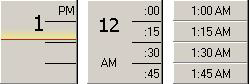
Setting the DisplayCurrentTime property to true causes the control to display a marker within the time line that represents the current time (as defined by the system clock). The colors used to highlight the current time are defined by the CurrentTimeColor and CurrentShadowColor properties. The first time line in the image above is displaying the current time.
Multiple Time Zones
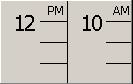
Setting the MultipleZones property is set to true splits the time line in two to allow multiple time zones to be displayed. The difference between the time zones is determined by the ZoneOffset property.