|
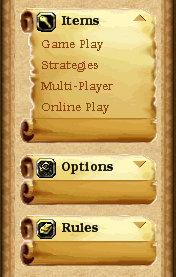
The dbicExplorerBar control is capable of using custom images for the background of the control, the list headers and footers, list items, and navigation arrows. This allows developers to “skin” the control to provide a custom look and feel.
NOTE: This feature is only available if the ControlType property is set to “Explorer”. This feature is not available with other control types.
To customize the dbicExplorerBar background, use the BackgroundImage property.
To customize the list header and footer use the ListHeaderImage and ListFooterImage properties of the List object.
NOTE: The dbiExplorerList object has a BackgroundImage property but it is only used inside the list area when the Panel property is set to a value of True. It should also be noted that the list footer will only be painted if an image is supplied to the ListFooterImage property.
To provide a custom image for the background of a list item, use the BackgroundImage property of the dbiExplorerItem object.
To provide custom images for the navigation arrows, set the ArrowUp and ArrowDown properties of the control.
NOTE : When the ListHeaderImage and/or ListFooterImage properties of the dbiExplorerList object are set, the header and/or footer will be painted in the horizontal center of the control. In the event the control’s scroll bar is visible, the images will remain in the same position and not be moved to accommodate the scroll bar. If the control is sized horizontally, the images will be moved to remain in the center of the control. If an image is used in the header of the list, the position of the navigation arrows will not be affected by the control’s scroll bar. The positioning of an image used for a list item is the same for the list headers and footers. This should be considered when using custom images for the list headers and items.
|