


 |
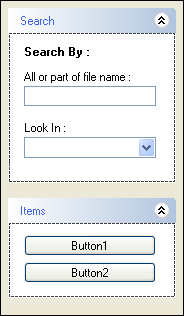
The dbicExplorerBar control is capable of hosting panels instead of list items in a list. To create a panel list, set the Panel property of the list to True. The Panel property can be found in the property inspector for a list object when creating the list in design-time. The Panel property can also be set at runtime when describing the list object in the Lists collection of the control.
A List object that is set to be a Panel is capable of hosting other objects such as trees, text boxes, combo boxes, etc. This allows the developer to build functional groups of controls contained within an ExplorerBar list.
|