Needles
The needle is the section of the gauge display that indicates the current value. The NeedleType property of the primary gauge (or the NeedleType property of the individual dbiGaugeObjects) determines the style of needle to use.
NOTE: Throughout this document, the various properties related to the needle of the Primary Gauge will be referenced and linked to. There are also corresponding properties on the individual dbiGaugeObject objects. The Needle related properties are pre-fixed with "Needle" or "Extension".
The currently available types are:

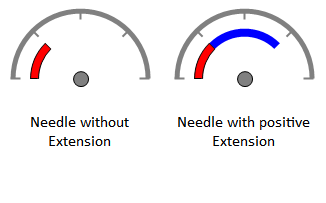
The Line and Arrow needles are simple bar type needles (extending from origin). A Radial needle fills a circular path (spanning from the AngleStart to AngleEnd) as the value of the gauge changes. A Marker needle is a circular object or user supplied image that follows a circular path (spanning from the AngleStart to AngleEnd) as the value of the gauge changes. The NeedleType property can also be set to “None” if no needle is to be displayed for a particular gauge.
By default, the Marker needle is a simple circle. However, it can be replaced by an image using the MarkerImage property.
The height/length of the needle is determined by the NeedleHeight property. In Line and Arrow type needles, the needle will start at the origin of the gauge and span outwards. In Radial and Marker needles, the NeedleHeight property determines the distance between the origin and the inside edge of the path the needle follows.
Extending a needle
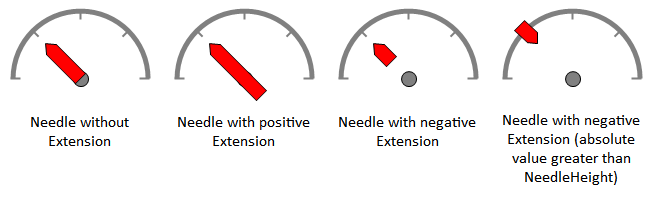
The appearance of the Line, Arrow and Radial needles can be extended beyond their current values through use of the NeedleExtension property (this property has no effect on Marker needles). This property will accept positive and negative integer values, resulting in different behavior depending on the current NeedleType.
Line:
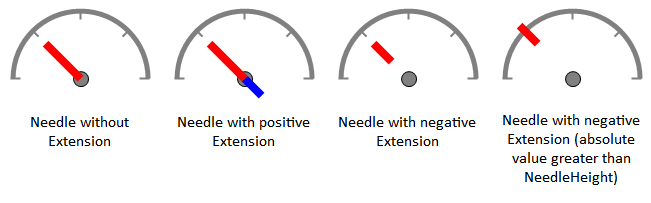
With a positive value, the extension will be drawn starting from origin and render in the opposite direction of the needle. A negative value will cause the line to have its length reduced (from origin towards the front) by the amount of the supplied value. A negative value,with it's absolute value greater than the current length, will have the needle rendered in an inverted display.
Arrow1:
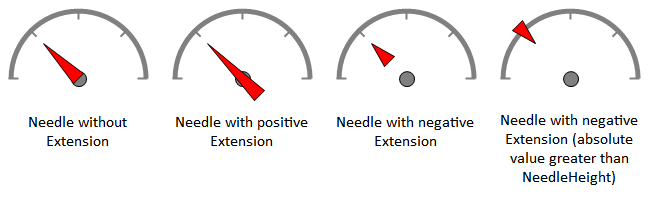
With a positive value, the back-half of the arrow will stretch back from origin. A negative value will compress the arrow from origin towards the front point. A negative value,with it's absolute value greater than the current length, will result in an inverted display of the arrow.
Arrow2:
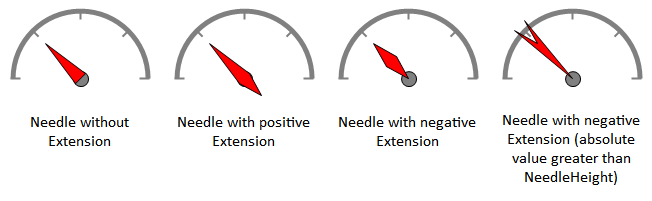
With a positive value, the location of the fourth point of the arrow will be extended out from the back middle of the arrow, creating a diamond shape. A negative value will still result in the diamond shape (based on an absolute value of the supplied negative integer), however it is points 2 and 3 that will shift towards the front point (and the arrow will be restricted from origin towards the front point). If a negative value,with it's absolute value greater than the current length, is supplied, then points 2 and 3 of the arrow will stretch past the front point.
Arrow3:
With a positive value, the back-half of the arrow will stretch back from origin. A negative value will compress the arrow from origin towards the front point. A negative value,with it's absolute value greater than the current length, will result in an inverted display of the needle.
Radial:
A supplied value (that exists between the current minimum and maximum of the gauge) will render a path (up to the supplied value) which will be drawn over by the radial needle as its value changes. If a value is supplied that is outside that range, it will be ignored.