


 Syntax
| Visual Basic (Declaration) | |
|---|---|
Public Enum enumFillType Inherits System.Enum | |
| C# | |
|---|---|
public enum enumFillType : System.Enum | |
Members
| Member | Description |
|---|---|
| Circle | The *BackColor (BackColorFrom) property will appear on all four sides of the control, and gradually turn into the *BackColorTo property towards the center of the control, displaying a circle  |
| Default | The default fill type. |
| Diagonal | The *BackColor (BackColorFrom) property will appear in the bottom/right corner of the control, and gradually turn into the *BackColorTo property in the top/left corner of the control.  |
| Diamond | The *BackColor (BackColorFrom) property will appear on all four corners of the control, and gradually turn into the *BackColorTo property towards the center of the control. A vertical and horizontal line will be displayed in the *BackColorTo value.  |
| Ellipse | The *BackColor (BackColorFrom) property will appear on all four sides of the control, and gradually turn into the *BackColorTo property towards the center of the control, displaying a circle. The circle in this pattern is more defined that in the Circle fill type.  |
| Horizontal | The *BackColor (BackColorFrom) property will appear on the left side of the control, and gradually turn into the *BackColorTo property on the right of the control.  |
| HorizontalBump | The *BackColor (BackColorFrom) property will appear on the left and right sides of the control, and gradually turn into the *BackColorTo property towards the center of the control.  |
| HorizontalEdge | A style where the Backcolor (BackColorFrom) meets the BackColorTo at a sharp horizontal point. |
| Pyramid | The *BackColor (BackColorFrom) property will appear on all four corners of the control, and gradually turn into the *BackColorTo property towards the center of the control. A diagonal line from each corner will be displayed in the *BackColorTo value.  |
| ReverseDiagonal | The *BackColor (BackColorFrom) property will appear in the bottom/left corner of the control, and gradually turn into the *BackColorTo property in the top/right corner of the control.  |
| Solid | Only the *BackColor (BackColorFrom) property will be displayed  |
| Starburst | A unique fill style with a bezier curve used in the fill style.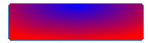 |
| Vertical | The *BackColor (BackColorFrom) property will appear on the top of the control, and gradually turn into the *BackColorTo property on the bottom of the control.  |
| VerticalBump | The *BackColor (BackColorFrom) property will appear on the top and bottom sides of the control, and gradually turn into the *BackColorTo property towards the center of the control.  |
| VerticalEdge | A style where the Backcolor (BackColorFrom) meets the BackColorTo at a sharp vertical point.  |
| VerticalEdge2 | A modified version of the VerticalEdge fill type that slightly adjusts the positioning of the colors to better fill larger areas.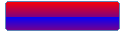 |

Inheritance Hierarchy
System.Object
System.ValueType
System.Enum
Dbi.enumFillType