


The control comes with 6 predefined display styles including Regular, Flat, IDE, Angled, Studio, and UserDrawn.
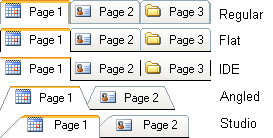
The display style can be set in design time by setting the TabStyle property in the property inspector. The display style can also be set at runtime in code …
Example:
VB.NET
DbicTabs.TabStyle = Dbi.WinControl.Tabs.enumTabStyle.IDE
C#
DbicTabs.TabStyle = Dbi.WinControl.Tabs.enumTabStyle.IDE;
If the UserDrawn style is selected, then the developer will need to use the UserDrawnTab event to handle the drawing of the tabs.
The control can also be defined as a Tab Strip, i.e. tabs without panels. This allows the developer to place a series of tabs onto other objects that may not need to be inside a tab panel.

NOTE: When selecting to rotate fonts to angles other than 0 degrees, text may appear jagged on screens using ClearType to smooth the edges of the fonts. There is no known solution to this issue at this time.