 |
|||||||||||||||||||||||||||||||||||||||||||||||||||||||||||||||||||||||||||||||||||||||||||||||||||||||||||||||||||
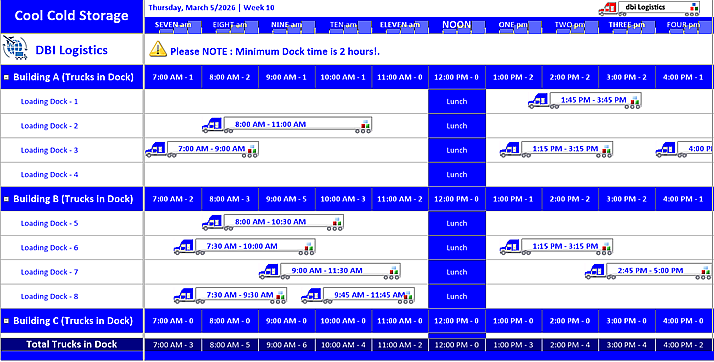
Potato chip production to your favourite Plumber's Schedule,
|
|||||||||||||||||||||||||||||||||||||||||||||||||||||||||||||||||||||||||||||||||||||||||||||||||||||||||||||||||||
 |
|||||||||||||||||||||||||||||||||||||||||||||||||||||||||||||||||||||||||||||||||||||||||||||||||||||||||||||||||||
 |
|||||||||||||||||||||||||||||||||||||||||||||||||||||||||||||||||||||||||||||||||||||||||||||||||||||||||||||||||||
|
|||||||||||||||||||||||||||||||||||||||||||||||||||||||||||||||||||||||||||||||||||||||||||||||||||||||||||||||||||
| Solutions Schedule .NET Core presents incredible functionality for Enterprise Resource Planning and Allocation specialists through its five primary elements - the structure of Solutions Schedule .NET Core: | |||||||||||||||||||||||||||||||||||||||||||||||||||||||||||||||||||||||||||||||||||||||||||||||||||||||||||||||||||
Time Bars, Resource Allocations + Appointments |
|||||||||||||||||||||||||||||||||||||||||||||||||||||||||||||||||||||||||||||||||||||||||||||||||||||||||||||||||||
| The five elements of Solutions Schedule allow the powerful presentation of resource data in five dimensions encompassing - Who, What, Where, When and Why - the five critial data points for uncommon Resource Allocation. | |||||||||||||||||||||||||||||||||||||||||||||||||||||||||||||||||||||||||||||||||||||||||||||||||||||||||||||||||||
 |
|||||||||||||||||||||||||||||||||||||||||||||||||||||||||||||||||||||||||||||||||||||||||||||||||||||||||||||||||||
|
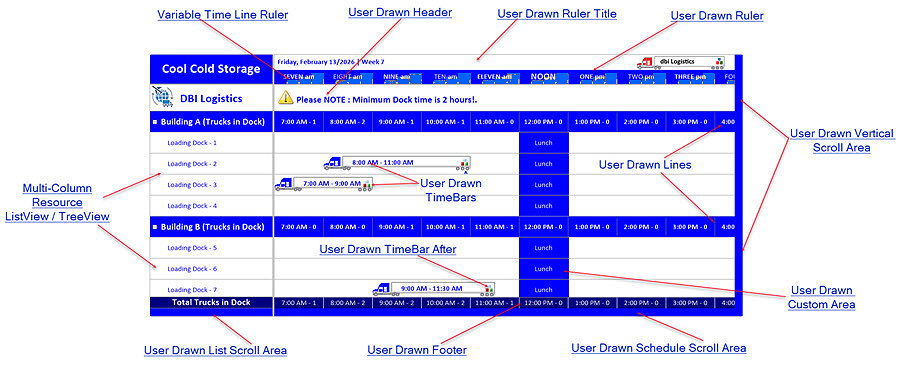
Variable Scale Ruler Area, which offers direct Time Line customization for creating plans and scheduled allocations based upon time types and time lines scales of Seconds to Years. |
|||||||||||||||||||||||||||||||||||||||||||||||||||||||||||||||||||||||||||||||||||||||||||||||||||||||||||||||||||
|
|||||||||||||||||||||||||||||||||||||||||||||||||||||||||||||||||||||||||||||||||||||||||||||||||||||||||||||||||||
|
Multi-Column ListView or TreeView Area, where developers define either style of data presentation - the direct edit ListView or the TreeView and connect data for presenting and interactive with categorized lists of Resources. |
|||||||||||||||||||||||||||||||||||||||||||||||||||||||||||||||||||||||||||||||||||||||||||||||||||||||||||||||||||
|
|||||||||||||||||||||||||||||||||||||||||||||||||||||||||||||||||||||||||||||||||||||||||||||||||||||||||||||||||||
|
Schedule Resource Allocation Area, where time bars are created and interacted with and through which developers defne the type of Allocation / Gantt style end-user interaction they wish to enable. Varying degrees of precision Allocations and supporting information can be surfaced in the Allocation - Planning - Scheduling Area. |
|||||||||||||||||||||||||||||||||||||||||||||||||||||||||||||||||||||||||||||||||||||||||||||||||||||||||||||||||||
 |
|||||||||||||||||||||||||||||||||||||||||||||||||||||||||||||||||||||||||||||||||||||||||||||||||||||||||||||||||||
|
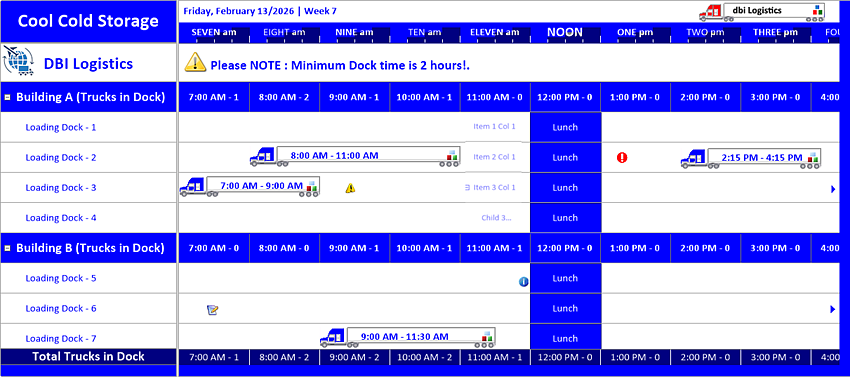
ListView / TreeView Items, which originate in the List View / Tree View area and carry through the Scheduling Area for contiguous representation of Resources and the tasks and roles assigned to them. |
|||||||||||||||||||||||||||||||||||||||||||||||||||||||||||||||||||||||||||||||||||||||||||||||||||||||||||||||||||
 |
|||||||||||||||||||||||||||||||||||||||||||||||||||||||||||||||||||||||||||||||||||||||||||||||||||||||||||||||||||
|
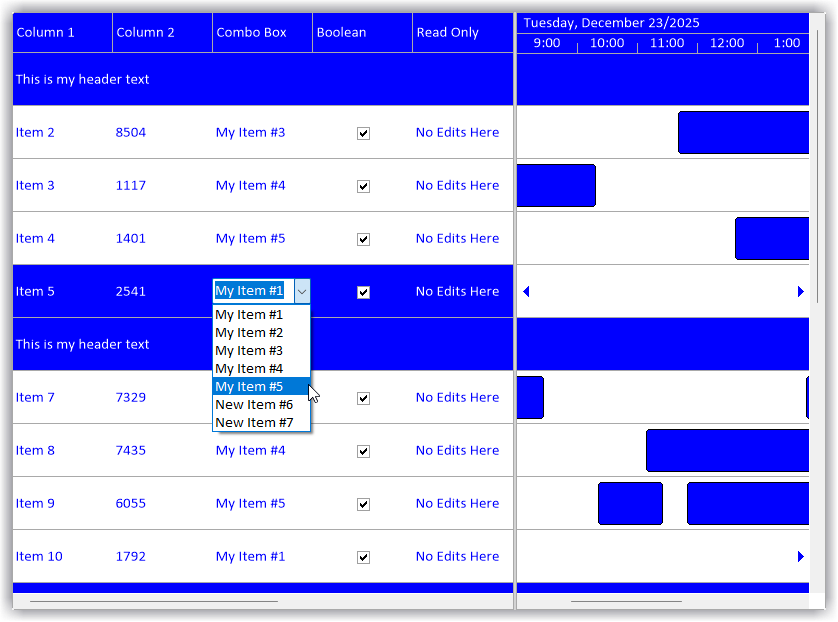
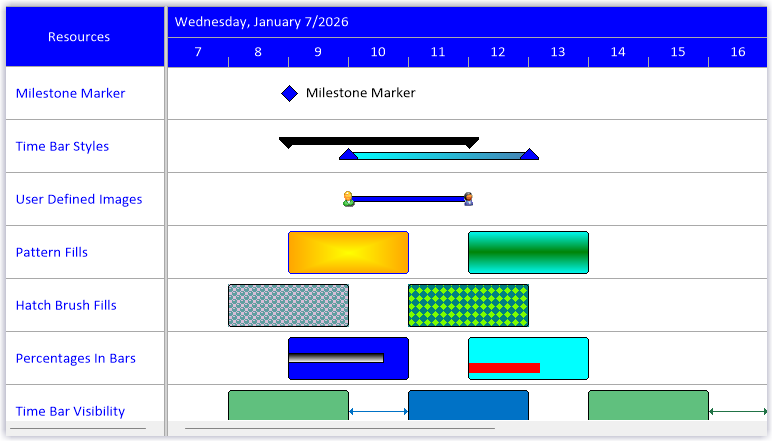
The Time Bars, which reside in the Schedule Area that complete DBI’s unique Gantt Style, intuitively interactive, Drag and Drop planning, Resource Allocation surface. |
|||||||||||||||||||||||||||||||||||||||||||||||||||||||||||||||||||||||||||||||||||||||||||||||||||||||||||||||||||
 |
|||||||||||||||||||||||||||||||||||||||||||||||||||||||||||||||||||||||||||||||||||||||||||||||||||||||||||||||||||
    |
|||||||||||||||||||||||||||||||||||||||||||||||||||||||||||||||||||||||||||||||||||||||||||||||||||||||||||||||||||
| Each of the primary elements that comprise Solutions Schedule are managed dynamically by the architecture and business rules applied through the construct of the control. | |||||||||||||||||||||||||||||||||||||||||||||||||||||||||||||||||||||||||||||||||||||||||||||||||||||||||||||||||||
| Developers are provided discrete programmability with full control over presentation - including user (owner) drawn features built into the List / Tree View, Time Line Ruler, Time Bars and Schedule area. To note, User Drawn features are found in the Enterprise Edition. | |||||||||||||||||||||||||||||||||||||||||||||||||||||||||||||||||||||||||||||||||||||||||||||||||||||||||||||||||||
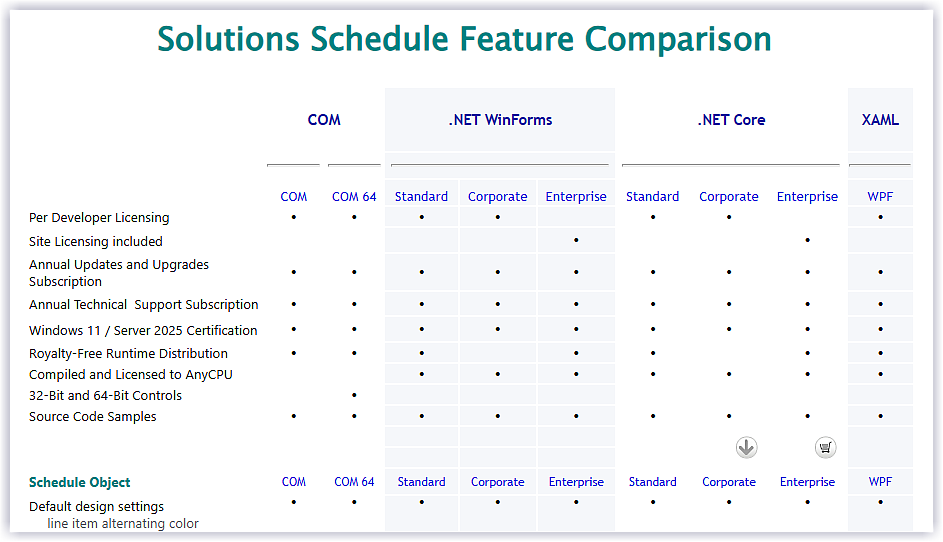
| Solutions Schedule Feature Comparison | |||||||||||||||||||||||||||||||||||||||||||||||||||||||||||||||||||||||||||||||||||||||||||||||||||||||||||||||||||
|
|||||||||||||||||||||||||||||||||||||||||||||||||||||||||||||||||||||||||||||||||||||||||||||||||||||||||||||||||||
Solutions Schedule Object Details |
|||||||||||||||||||||||||||||||||||||||||||||||||||||||||||||||||||||||||||||||||||||||||||||||||||||||||||||||||||
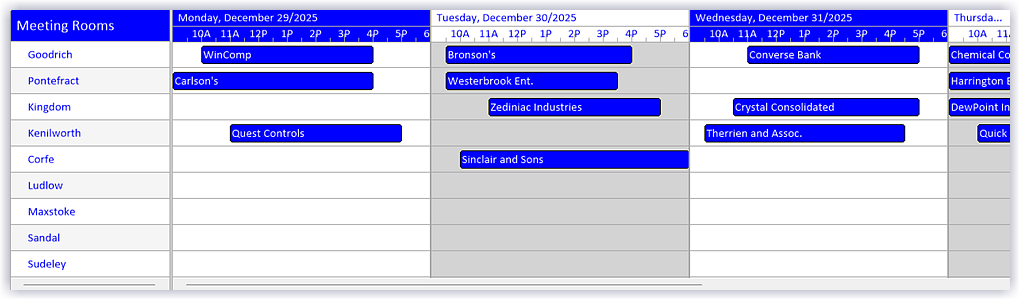
| The Schedule Area offers developers and end-users an intuitive Gantt style, drag and drop area for planning, scheduling and Allocating multiple resources grouped and organized as required across various time lines and time-period presentations. | |||||||||||||||||||||||||||||||||||||||||||||||||||||||||||||||||||||||||||||||||||||||||||||||||||||||||||||||||||
| When managing resources across domains and with varying time tables there is a significant advantage offered by Solutions Schedule Enterprise Edition - being able to present multiple planning boards each with differing time scales and schedule period spans (days, weeks etc.) - and all in one view that also allows dragging and dropping between the schedule objects for increased efficiency. | |||||||||||||||||||||||||||||||||||||||||||||||||||||||||||||||||||||||||||||||||||||||||||||||||||||||||||||||||||
 |
|||||||||||||||||||||||||||||||||||||||||||||||||||||||||||||||||||||||||||||||||||||||||||||||||||||||||||||||||||
| Within the Schedule Area there are a number of objects that offer fine grained interaction enhancing the accuracy of resource allocations: | |||||||||||||||||||||||||||||||||||||||||||||||||||||||||||||||||||||||||||||||||||||||||||||||||||||||||||||||||||
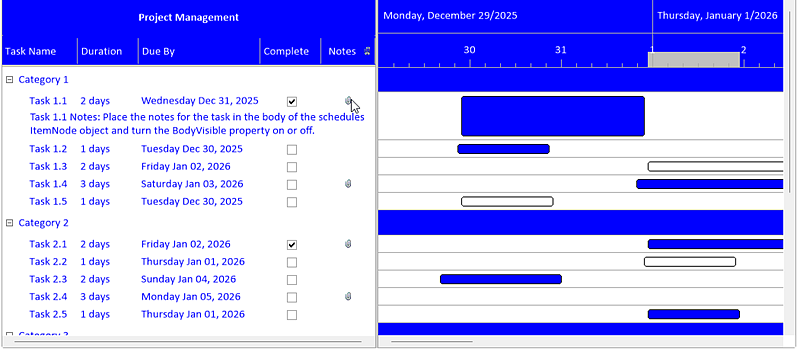
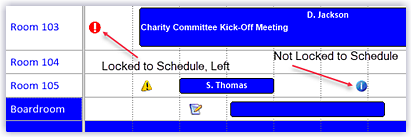 Notes
- are stationary visual objects in the schedule.
Tool tips with information about the note are displayed when
the mouse hovers over the Note icon. Notes can be used to draw
attention to important aspects of a schedule. Notes
- are stationary visual objects in the schedule.
Tool tips with information about the note are displayed when
the mouse hovers over the Note icon. Notes can be used to draw
attention to important aspects of a schedule. |
|||||||||||||||||||||||||||||||||||||||||||||||||||||||||||||||||||||||||||||||||||||||||||||||||||||||||||||||||||
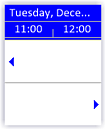 Line
Arrows - are images placed at the start or end
of a schedule item notifying the end-user that other tasks
have been scheduled that are not within the viewable schedule
area. Line
Arrows - are images placed at the start or end
of a schedule item notifying the end-user that other tasks
have been scheduled that are not within the viewable schedule
area. |
|||||||||||||||||||||||||||||||||||||||||||||||||||||||||||||||||||||||||||||||||||||||||||||||||||||||||||||||||||
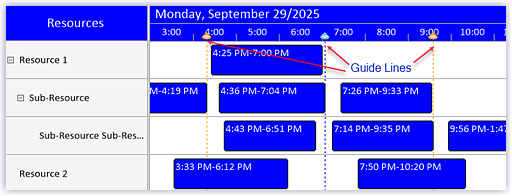 Guide Lines
- are vertical lines within the
schedule area for representing a critical point in time and
also to help align time bars accurately. Guide Lines
- are vertical lines within the
schedule area for representing a critical point in time and
also to help align time bars accurately. |
|||||||||||||||||||||||||||||||||||||||||||||||||||||||||||||||||||||||||||||||||||||||||||||||||||||||||||||||||||
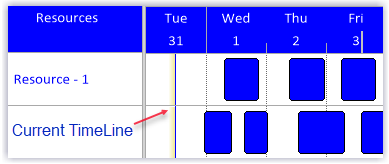 Current
Time Line - is a vertical line drawn in the schedule
area representing the current time of day. The Current Time
Offset property can be used to display the line in different
time zones. Current
Time Line - is a vertical line drawn in the schedule
area representing the current time of day. The Current Time
Offset property can be used to display the line in different
time zones. |
|||||||||||||||||||||||||||||||||||||||||||||||||||||||||||||||||||||||||||||||||||||||||||||||||||||||||||||||||||
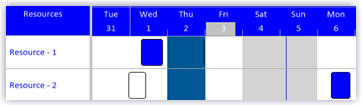 Dead
Zones - set specific areas of the schedule where
activities cannot be set - mouse actions are not allowed to
create or move time bars in a dead zone. Dead
Zones - set specific areas of the schedule where
activities cannot be set - mouse actions are not allowed to
create or move time bars in a dead zone. |
|||||||||||||||||||||||||||||||||||||||||||||||||||||||||||||||||||||||||||||||||||||||||||||||||||||||||||||||||||
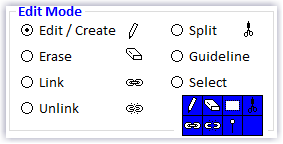 Edit
Modes - extend or restrict the CRUD aspects of
Solutions Schedule .NET. There are seven specific edits modes:
Edit, Erase, Select, Link, Unlink, Split and Guideline, which
can be presented via the Edit Modes Toolbar object. Edit
Modes - extend or restrict the CRUD aspects of
Solutions Schedule .NET. There are seven specific edits modes:
Edit, Erase, Select, Link, Unlink, Split and Guideline, which
can be presented via the Edit Modes Toolbar object. |
|||||||||||||||||||||||||||||||||||||||||||||||||||||||||||||||||||||||||||||||||||||||||||||||||||||||||||||||||||
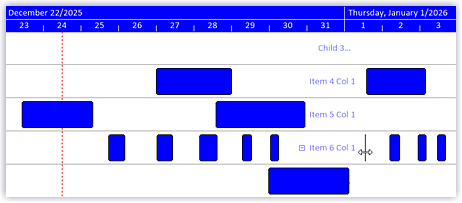 List
Guide - when working with large planning boards
having thousands of resources and exponential allocations, the
List Guide offers a high degree of accuracy especially when
the ListView / TreeView is not in view. List
Guide - when working with large planning boards
having thousands of resources and exponential allocations, the
List Guide offers a high degree of accuracy especially when
the ListView / TreeView is not in view. |
|||||||||||||||||||||||||||||||||||||||||||||||||||||||||||||||||||||||||||||||||||||||||||||||||||||||||||||||||||
|
|
|||||||||||||||||||||||||||||||||||||||||||||||||||||||||||||||||||||||||||||||||||||||||||||||||||||||||||||||||||
Multi Column LIstView / TreeView Object Details |
|||||||||||||||||||||||||||||||||||||||||||||||||||||||||||||||||||||||||||||||||||||||||||||||||||||||||||||||||||
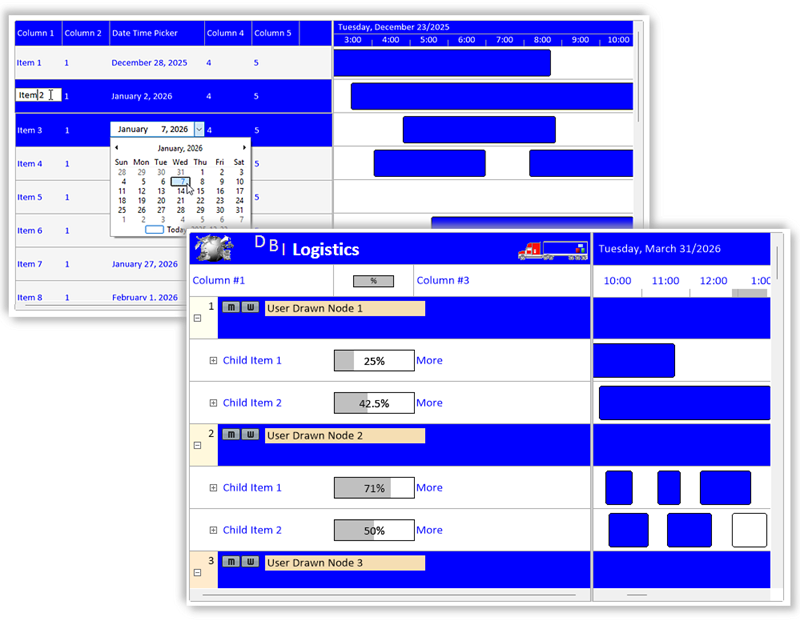
| Solutions Schedule .NET offers two operational modes for displaying Resources - a traditional multi - column List View, as well, a Tree View: | |||||||||||||||||||||||||||||||||||||||||||||||||||||||||||||||||||||||||||||||||||||||||||||||||||||||||||||||||||
|
|||||||||||||||||||||||||||||||||||||||||||||||||||||||||||||||||||||||||||||||||||||||||||||||||||||||||||||||||||
| In addition to the multi column list and tree view options, there are many customization and intuitive end-user features that allow for unique Resource Allocation for ERP, MRP and other planning presentations, including: | |||||||||||||||||||||||||||||||||||||||||||||||||||||||||||||||||||||||||||||||||||||||||||||||||||||||||||||||||||
| In Cell Editing: | |||||||||||||||||||||||||||||||||||||||||||||||||||||||||||||||||||||||||||||||||||||||||||||||||||||||||||||||||||
|
|||||||||||||||||||||||||||||||||||||||||||||||||||||||||||||||||||||||||||||||||||||||||||||||||||||||||||||||||||
|
|
|||||||||||||||||||||||||||||||||||||||||||||||||||||||||||||||||||||||||||||||||||||||||||||||||||||||||||||||||||
Variable Time Scale Ruler |
|||||||||||||||||||||||||||||||||||||||||||||||||||||||||||||||||||||||||||||||||||||||||||||||||||||||||||||||||||
|
|||||||||||||||||||||||||||||||||||||||||||||||||||||||||||||||||||||||||||||||||||||||||||||||||||||||||||||||||||
Time Bar Features |
|||||||||||||||||||||||||||||||||||||||||||||||||||||||||||||||||||||||||||||||||||||||||||||||||||||||||||||||||||
|
|||||||||||||||||||||||||||||||||||||||||||||||||||||||||||||||||||||||||||||||||||||||||||||||||||||||||||||||||||
|
|
|||||||||||||||||||||||||||||||||||||||||||||||||||||||||||||||||||||||||||||||||||||||||||||||||||||||||||||||||||
General Features of Solutions Schedule .NET Core |
|||||||||||||||||||||||||||||||||||||||||||||||||||||||||||||||||||||||||||||||||||||||||||||||||||||||||||||||||||
|
|||||||||||||||||||||||||||||||||||||||||||||||||||||||||||||||||||||||||||||||||||||||||||||||||||||||||||||||||||
Explore the full list of features by Solutions Schedule Product Edition... Compare |
|||||||||||||||||||||||||||||||||||||||||||||||||||||||||||||||||||||||||||||||||||||||||||||||||||||||||||||||||||
See what's new in Solutions Schedule .NET... What's New |
|||||||||||||||||||||||||||||||||||||||||||||||||||||||||||||||||||||||||||||||||||||||||||||||||||||||||||||||||||
Solutions Schedule .NET Core - Licensing Options |
|||||||||||||||||||||||||||||||||||||||||||||||||||||||||||||||||||||||||||||||||||||||||||||||||||||||||||||||||||
|
|||||||||||||||||||||||||||||||||||||||||||||||||||||||||||||||||||||||||||||||||||||||||||||||||||||||||||||||||||
|
|
|||||||||||||||||||||||||||||||||||||||||||||||||||||||||||||||||||||||||||||||||||||||||||||||||||||||||||||||||||
Advanced multi resource allocation across people, assets, and
tasks - Solutions Schedule .NET Core is a high-performance resource
allocation component solution optimized for large-scale datasets.
Flexible visualization with user-drawn functionality makes drag and
drop Gantt-style planning and timeline views a snap. Seamless
integration into existing enterprise systems and workflows with a
modern architecture aligned for today's development strategies. Built
for Today’s Enterprise Developers