


Pin
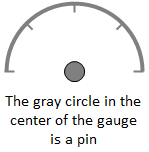
A Pin is a marker located at the origin of the gauge. By default, the Pin of any gauge is hidden but can be toggled on to display either in Front or in Back of the needle of the respective gauge. The standard appearance of the Pin, is of a circle and the colors and style used to render it are determined by the "Pin" prefixed properties of the gauge that contains it.
The Pin is not only designed as an indicator of origin of the respective gauge, but the displays of the Pin of multiple gauges can be combined to create a more complex and advanced display.

The above image display uses a combination of 4 pins, from four different gauges, to create the unique display. Each of the Pins uses a gradient fill to achieve the metallic and shiny appearance.
The code for achieving this display can be found inside the sample applications (C# and VB .NET source code) that ship with the product.
Additional details on working with multiple gauges in a single display can be found here: Using Multiple Gauges in a single display.