dbicDial  -  is an ideal control for creating system interfaces and UX instrumentation solutions for a host of technical, testing, data acquisition and general system requirements. dbicDial represents the progress of an activity in a customizable and visually appealing real time display.
 
Advanced UI / UX  -  dbicDial accepts and displays a range of specific data inputs for custom real-time UI / UX presentations.

dbicDial - Studio Controls .NET Core - Dashboard Control Dials

  • Customizable Dial Positioning
  • Indedpendent Dial and Marker Images
  • User Drawn Dial and Knob presentations
  • User Drawn Marker
  • Dimensional Effects
  • Dial Change Event displaying real-time data input
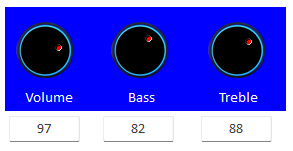
Studio Controls .NET Core - dbicDial Custom DashBoard Radio, Music Style Dial presentations


Customizable Positioning  -  The start and end values and angles of rotation are all developer definable for full control over the dial interface.
 
Studio Controls .NET Core - dbicDial Control - Custom Dashboard Dial Presentations
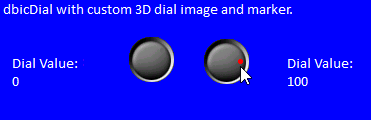
Independent Dial and Marker Images
 -  Developers have complete control over the component's graphical presentation by using custom images and masked colours.

Dimensional Effects  -  In addition to the custom image and masked colour options, developers can also choose two and three dimensional styles.
 

Purchase Solutions Schedule .NET CoreEvaluate Solutions Schedule .NET Core dbicDayView Detailed Component Help


dbicButton dbicCalc  dbicCalendar
dbicDate   dbicDayView dbicDial
 dbicDigit dbicDropDate   dbicExplorerBar
 dbicGauge  dbicLabel  dbicListView
 dbicMeter  dbicMonth  dbicSlide 
 dbiTabs   dbicTips dbicPIM
Purchase Solutions Schedule .NET CoreEvaluate Solutions Schedule .NET Core dbicDayView Detailed Component Help
 

Included with Studio Controls .NET Core Annual Subscription:

  • 17 High Calibre Affordable UX Design Controls
  • Royalty-Free Run-Time Distribution

  • Per Control Sample Applications written in...

    • C#, VB .NET  and  Compiled

  • 50 Individual Control Samples

  • Online / Offline Licensing and Activations

 
  • Component Updates
  • Component Upgrades

  • Product Ugrades

  • Direct Access to Technical Support

  • Component repairs as they are released

  • Online / Offline License Management


Purchase Solutions Schedule .NET CoreEvaluate Solutions Schedule .NET Core   

Studio Controls .NET Core - Licensing Options

Single Developer: A single developer license accommodating a maximum of two (2) concurrent activations per developer license, which activations could be assigned to - a primary development machine, a laptop or build server      Purchase Today
   
Five Developer: Five developer license accommodating two concurrent activations per developer, which could be a combination of primary development system, laptop or build server
   
Site License: Accommodating up to 100 concurrent activatons, which can be any combination of developers, primary development systems, laptops and build servers
     
   
Purchase Solutions Schedule .NET CoreEvaluate Solutions Schedule .NET Core  
 
A Sample of DBI Long-term customers using Solutions Schedule
A Sample of Long-Term Solutions Schedule Licensees
 
DBI Earns Top 100 Control Publisher World Wide for 2025 DBI Top 100 Control Publisher World Wide 2024 DBI Top 100 Control Publisher World Wide 2023 DBI Top 100 Control Publisher World Wide 2022 DBI Top 100 Control Publisher World Wide 2021 DBI Top 50 Control Publisher World Wide 2020 DBI Top 50 Control Publisher World Wide 2019 DBI Top 50 Control Publisher World Wide 2019