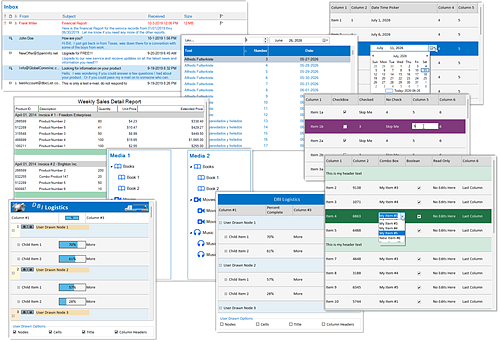
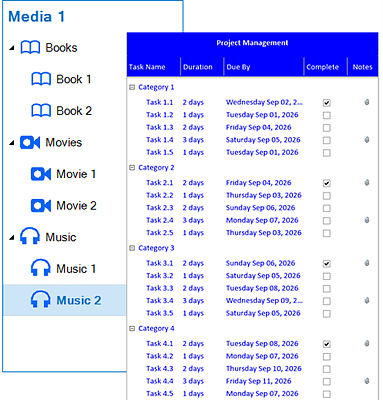
dbicListView  -  brings together the absolute best in ListView controls integrated with the ultimate in multi-mode TreeView controls offering developers an extreme direct edit and data presentation Grid-like, snap-In data visualization and Reporting component for .NET Core Windows app developers.
 
Advanced UI / UX  -  In addition to the multi column list and tree view options, there are many customization and intuitive end-user features that allow for unique ERP, MRP and other planning presentations, including:
 
List / Tree View - In Cell Editing:

dbicListView - Studio Controls .NET Core - Grid-like ListView and TreeView Data Visualization

  • Built in edit box and combo box
  • Support for 3rd party edit controls
  • Standard edit modes: <Enter>, <Esc>, <Tab>, and <Shift Tab> for navigation
  • Modify the Edit Controls default move and size settings
  • Direct access of text and combo boxes for:
    • Addition of new navigation keys
    • Overriding behavior of existing navigation keys
    • Creating edit masks
    • User Drawn List Items
 
List / Tree View Options:

dbicListView - Studio Controls .NET Core - Grid-like ListView and TreeView Data Visualization Excel Resizing

  • Change Line Item height by click and drag
  • Change Column widths by click and drag
  • Column Sorting built-in
  • Line Item Headers independent of columns
  • *Click and drag line items within parent group
  • Line Item sub text
  • Booleans – support for check boxes in a column
 
 
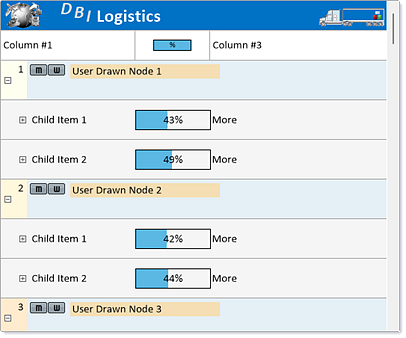
dbicListView - Studio Controls .NET Core - Grid-like ListView and TreeView Data Visualization User Drawn


List / Tree View Area - User Drawn: 

• List / Tree View Area - User Drawn Features
• Line Item – Override the default painting of a line item
• Cells – Override the default painting of a single line item cell
• Column Headers Override default column header painting
• Title Override the default painting of the list title
 
In the same category as data grids dbicListView is a transformative data visualization control complete with an integrated TreeView for hierarchical data presentations. An excellent snap-in data visualization and reporting control for .NET Core Windows app developers. 
 
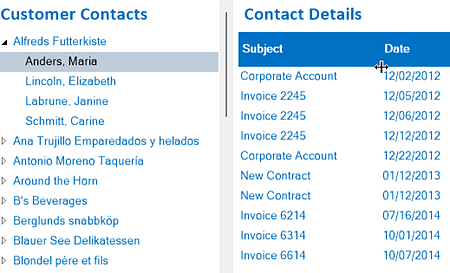
TreeView components present hierarchical data structures in a navigable interface. Developers can display nested datasets with expandable and collapsible nodes, customize node content with text or images, and provide interactive navigation structures that support application menus or complex data hierarchies.
 dbicListView - Studio Controls .NET Core - TreeView

Reporting  -  Built-in print preview and print report functions. Developers have control over report presentation including page headers and page footers.


Body Text  -  Vertical item resizing programmatically or interactive user input. Definable, start - end columns and horizontal offsets influence auto text wrapping.


Drag Drop  -  in and out of the control. Use dbicListView custom events for moving and incorporating data.


Search and Sort  -  built-in sorting based on data type also sort method for building more complex developer defined sorting.


Purchase Solutions Schedule .NET CoreEvaluate Solutions Schedule .NET Core dbicDayView Detailed Component Help 
 
dbicButton dbicCalc  dbicCalendar
dbicDate   dbicDayView dbicDial
 dbicDigit dbicDropDate   dbicExplorerBar
 dbicGauge  dbicLabel  dbicListView
 dbicMeter  dbicMonth  dbicSlide 
 dbiTabs   dbicTips dbicPIM
Purchase Solutions Schedule .NET CoreEvaluate Solutions Schedule .NET Core dbicDayView Detailed Component Help
 

Included with Studio Controls .NET Core Annual Subscription:

  • 17 High Calibre Affordable UX Design Controls
  • Royalty-Free Run-Time Distribution

  • Per Control Sample Applications written in...

    • C#, VB .NET  and  Compiled

  • 50 Individual Control Samples

  • Online / Offline Licensing and Activations

 
  • Component Updates
  • Component Upgrades

  • Product Ugrades

  • Direct Access to Technical Support

  • Component repairs as they are released

  • Online / Offline License Management


Purchase Solutions Schedule .NET CoreEvaluate Solutions Schedule .NET Core   

Studio Controls .NET Core - Licensing Options

Single Developer: A single developer license accommodating a maximum of two (2) concurrent activations per developer license, which activations could be assigned to - a primary development machine, a laptop or build server      Purchase Today
   
Five Developer: Five developer license accommodating two concurrent activations per developer, which could be a combination of primary development system, laptop or build server
   
Site License: Accommodating up to 100 concurrent activatons, which can be any combination of developers, primary development systems, laptops and build servers
     
   
Purchase Solutions Schedule .NET CoreEvaluate Solutions Schedule .NET Core  
 
A Sample of DBI Long-term customers using Solutions Schedule
A Sample of Long-Term Solutions Schedule Licensees
 
DBI Earns Top 100 Control Publisher World Wide for 2025 DBI Top 100 Control Publisher World Wide 2024 DBI Top 100 Control Publisher World Wide 2023 DBI Top 100 Control Publisher World Wide 2022 DBI Top 100 Control Publisher World Wide 2021 DBI Top 50 Control Publisher World Wide 2020 DBI Top 50 Control Publisher World Wide 2019 DBI Top 50 Control Publisher World Wide 2019