|
There are
several "HitTest" methods available for the ctSchedule.ocx (Solutions
Schedule COM). These methods can be used for raising
custom dialogs, tooltips and whiteboard style solutions.
They can also be used for customizing drag/drop operations.
Some are accessed using x and y coordinates, x-coordinates
or y-coordinates.
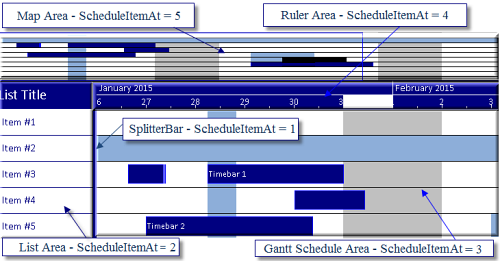
The
ScheduleItemAt Method will indicate the area of the
ctSchedule control for the supplied coordinates.
The LineAt Method will
indicate the list item for the supplied y-coordinate.
The DateAt Method will
indicate the date value for the supplied x-coordinate.
The TimeAt Method will
indicate the time value for the supplied x-coordinate.
The NoteAt Method will
indicate the index of the note at the specified coordinates.
The TimeBarsAt Method will
return the count of the timebars at the specified
coordinates.
The FindFirstTimeBar Method
will return the index of the first timebar at the specified
coordinates.
The FindNextTimeBar Method
will return the index of the next timebar at the specified
coordinates.
The ColorBarsAt Method
will return the count of the colorbars at the specified
coordinates.
The FindFirstColorBar Method
will return the index of the first colorbar at the specified
coordinates.
The FindNextColorBar Method
will return the index of the next colorbar at the specified
coordinates.
These methods can be called from anywhere, but the x and y
coordinates must be in pixels relative to the control. As
such vb6 may require the use of twips per pixel
calculations. For more information see the demo applications
found in both VFP9 and VB6.
For a complete discussion on Hit
Test Methods and other features of Solutions Schedule COM
v12.0 download the full evaluation (link below), open
the product manager and select the Help File section.
Look under the 'Developing With' for this and other tutorial
based instructive guides.
Complete information about Solutions Schedule COM
can be found
here:
(
https://www.dbi-tech.com/ProductPage_SolutionsSchedule.aspx
)
|