|
|
|
|
|
ActiveX
Controls
for Enterprise
Application Design |
| |
|
|
|
|
|
|
|
|
|
|
|
  |
|
|
|
|
|
|
|
|
ctToolBar is a horizontal and vertical
toolbar and menu component displaying a
series of buttons used to create a
custom toolbar. Toolbar buttons may be
set with a variety of styles such as
regular, drop down, toggle, and
separators. |
|
| |
|
|
| |
|
|
| |
 |
|
| |
|
|
| |
|
|
| |
In addition to displaying text, buttons
can also display images from the
internal image list. Tool tips and
drop-down menus may also be assigned to
individual buttons. |
|
| |
|
|
| |
XML Support : All
data, including presentation detail and
style settings, consumed by ctToolBar
can be imported from or exported to an
XML file. |
|
| |
|
|
| |
Current Windows Styles
: New style properties allow the control
to mimic the latest modern Windows UI
styles. |
|
| |
|
|
| |
Mouse Over and Select Status
: Optionally change images, fonts, and
colors for each button and menu item in
response to mouse- over events or when
button is selected. |
|
| |
|
|
| |
 |
|
| |
Button Styles : Set
buttons as regular, toggle, drop down or
with separators. Create buttons with
text and/or images. |
|
| |
|
|
| |
Definable Colors :
Gradient fills may be assigned to the
toolbar and menu items, as well as the
entire toolbar and the menu margin. Set
or return the foreground color of a
ToolBar Button. |
|
| |
|
|
|
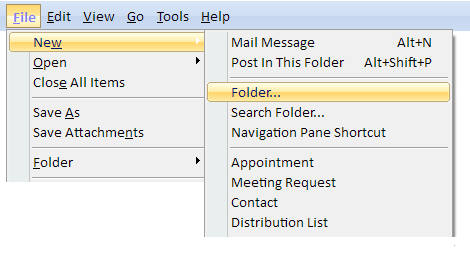
Multiple Levels : The
control can now support four levels of
menu items. |
|
| |
|
|
| |
Image List : Store up
to 100 images in an internal image list.
Support for masked bitmaps. |
|
| |
|
|
| |
Stock Images : Built in
images for many of the most commonly
used buttons (i.e. cut, copy, paste). |
|
| |
|
|
| |
 |
|
| |
|
|
| |
Custom Backgrounds :
Apply a custom background to the tool
bar. |
|
| |
|
|
| |
Tool Tips : Assign a
tool tip to any button in the tool bar. |
|
| |
|
|
| |
Bar Picture : Place an
image at the front of the toolbar. |
|
| |
|
|
| |
Limit Buttons : Arrows
on the toolbar indicate when there is
not enough room to display all buttons.
Additional items will drop down in a
menu when this area is clicked. Also,
Menu items can be created and directly
assigned to the limit button only. |
|
| |
|
|
| |
Menu Styles : Add
images, icons, check boxes, or
independent colors to any drop-down menu
item. |
|
| |
|
|
| |
 |
|
| |
|
|
| |
Menu Builder : The
special menu-builder property page makes
it quick and easy to plan and create
toolbar and menu structures. |
|
| |
|
|
| |
|
|
| |
|
|
|
|
| |
|
|
|
|
| |
|
|
|
|
| |
 |
|
| |
|
|
|
|
| |
|
|
|
|
| |
|
|
|
|