|
|
Visualizing Enterprise Resource
Data
|
| |
|
|
|
|
Studio Controls
.NET
|
  |
| |
|
|
|
|
|
Studio Controls .NET provides
High-impact, user experience (UX)
WinForms controls for building
Office-style Appointment Scheduling,
real-time Data Input, Data Selection,
ListView and TreeView Data
Presentations, data acquisition
Dashboard graphic and animated Date
Selection to meter controls controls. |
|
|
|
For fast design to speedy app
implementation, Studio Controls for .NET
provides WinForms developers with the
right set of tools and the right mix of
form and functionality for the most
demanding, high volume work environment
applications. Fewer controls to manage,
with greater functionality. |
| |
|
|
|
|
|
- Appointment Scheduling
- Data Entry
- Data Presentation
- Snap-In-Reporting
- Navigation
- Windows UI Design
-
User Drawn Customization
|
|
|
| |
|
|
|
|
| |
|
|
| |
|
|
|
|
| |
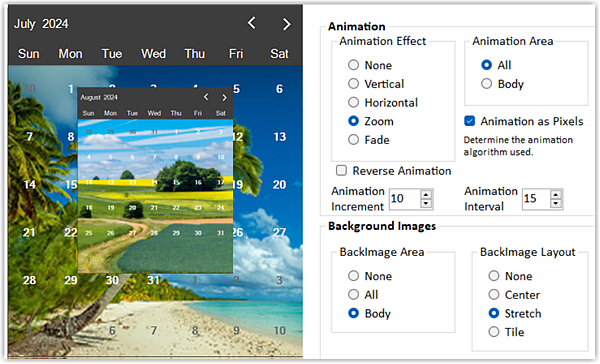
Special feature highlight - dbiDate
animated calendar transitions...dbiDate
v5.0
- Animated Calendar Navigation
- New navigation button style
Presentation Features
- View the Animated Calendar Transition
Video = https://youtu.be/CexQQPL1UyY |
|
| |
|
| |
|
| |
|
| |
|
|
|
|
| |
 |
|
| |
|
|
|
|
|
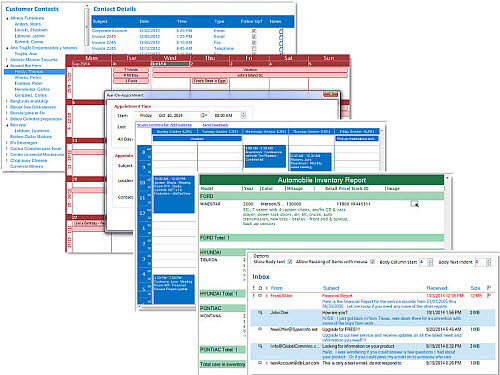
Appointment Scheduling, Time Tabling,
Day Timer ... you name it DBI's
Scheduling component software is the
number one choice of Visual Studio
developers. Don't settle for less - when
integrating Microsoft Outlook is not an
option get the number one
appointment scheduling and modern
Windows UI design controls - all found
in Studio Controls for .NET! |
| |
|
|
|
|
|
 |
|
| |
|
|
|
|
|
|
|
Time management and resource scheduling
are success driven activities. Studio
Controls for .NET is a comprehensive set
of controls for managing and presenting
enterprise information for planning and
scheduling multiple resources within
Visual Studio. |
| |
|
|
|
|
| |
|
|
|
|
|
|
|
Calendars :: Time is a sensitive issue
and using the right calendar and
appointment scheduling components
can mean the difference of releasing on
time. Create your own style, calendar
and scheduling presentations quickly. |
|
 |
| |
| |
| |
| |
| |
|
|
| |
|
|
|
|
|
|
|
|
General Presentation :: Add Flexibility
and dashboard features to your favorite
IDE with the great presentation tools of
Studio Controls for .NET. DBI's UI
design and presentation controls allow
for custom branding, interface design
and ease of implementation, saving hours of
development time. |
|
|
|
| |
 |
| |
| |
| |
| |
| |
| |
| |
|
|
| |
|
|
| |
 |
|
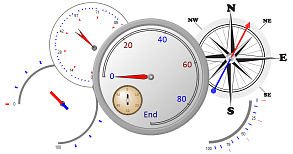
Gauges ::
dbiGauge is an ambidextrous control
comprised of a gauge object, a needle
object and a pin object, offering
developers a range of presentation
options from simple gauges to complex
multi-data point presentations all in a
single instance. |
|
| |
|
|
| |
|
|
| |
|
|
| |
|
|
| |
|
|
|
| |
|
|
|
| |
|
|
|
|
| |
|
|
|
|
| |
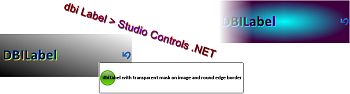
Labels :: Add a
little flair to application titles and
form labels.
dbi Label offers developers a modern
Visual Studio .NET control for elegant
yet simple and straight forward
enhancements. |
|
 |
|
| |
|
|
| |
|
|
| |
|
|
| |
|
|
| |
|
|
|
|
| |
|
|
|
|
| |
 |
|
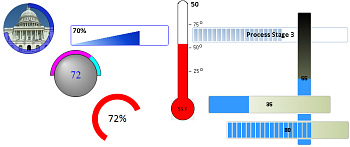
Meters :: Project
real-time data and progress status in a
variety of digital and graphical
presentations.
dbiMeter accelerates data
visualization with the least amount of
programming. |
|
| |
|
|
| |
|
|
|
| |
|
|
|
|
| |
|
|
|
|
 |
|
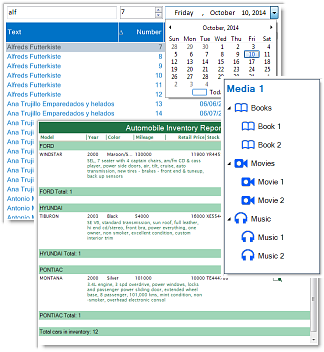
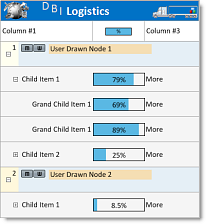
List and Tree Views ::
dbiList is an
integrated data List view and a
hierarchical Tree view all in one
control for fast direct entry and presentation of data,
reporting and data navigation.
At the heart of Power is Performance and
Functionality. When crafting a data
intensive application you want the
industry proven performance of DBI's
data management controls. Capable of
handling millions of rows of data
providing results beyond expectations.
|
| |
| |
| |
| |
| |
| |
| |
| |
| |
| |
| |
| |
| |
| |
| |
| |
|
|
|
|
In addition to the multi column list and
tree view options, there are many
customization and intuitive end-user
features that allow for unique ERP, MRP
and other planning presentations,
including: |
| |
|
|
|
|
| |
|
|
|
List / Tree View - In Cell Editing |
|
 |
Built in edit box and combo box |
|
|
|
Support for 3rd party edit controls |
|
|
|
Standard edit modes: <Enter>, <Esc>,
<Tab>, and <Shift Tab> for navigation |
|
|
Modify the Edit Controls default move
and size settings |
|
|
|
Direct access of text and combo boxes
for: |
|
| |
• Addition of new navigation keys |
|
| |
• Overriding behavior of existing
navigation keys |
 |
| |
• Creating edit masks |
| |
|
|
List / Tree View Options |
|
|
Change Line Item height by click
and drag |
|
|
Change Column widths by click
and drag |
|
|
Column Sorting built-in |
|
|
Line Item Headers independent of
columns |
|
|
*Click and drag line items
within parent group |
|
|
Line Item sub text |
|
|
Booleans – support for check
boxes in a column |
| |
|
|
|
List / Tree View Area -
User Drawn Features |
|
| |
• Line Item – Override the
default painting of a line item |
|
| |
• Cells – Override the default
painting of a single line item
cell |
| |
• Column Headers – Override the
default painting of a column
header |
| |
• Title - Override the default
painting of the list title. |
|
| |
|
|
|
|
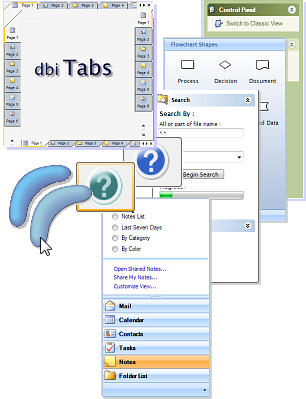
Navigation :: Extend
the Windows interface standards quickly
and effortlessly using DBI's navigation
and UI design controls for great
presentations and user navigation. |
|
 |
|
| |
|
| |
|
| |
|
| |
|
| |
|
| |
|
| |
|
|
|
|
|
|
|
|
|
Data Edits :: Data
input, editing and presentation are at
the heart of every modern application.
Add effective Windows user interfaces
quickly using your favorite data
connections and your choice of Data
Sources. |
|
|
| |
|
| |
|
| |
|
|
|
| |
|
| |
|
| |
|
|
|
DBI's underlying foundation layer is a
single point for all common visual
presentations and data interaction for
each instance of the
dbiCalendar,
dbiDayView and
dbiMonth controls that are included
in Studio Controls for .NET.
|
|
|
| |
|
| |
|
| |
|
| |
|
| |
|
|
|
Connect your scheduling data to DBI's
underlying data manager (dbiPIM.dll) and
maintain communication with each
instance of the control with a direct
reference. |
| |
|
|
|
|
|
|
|
|
| |
|
|
|
|
| |
|
|
|
|