|
|
Enterprise
Application Design
&
Scheduling
|
| |
|
|
|
|
|
|
|
|
|
|
|
dbiDayView - provides unmistakable
choices for developers looking to create
Outlook style appointment scheduling and
day planning functionality for their
enterprise .NET applications.
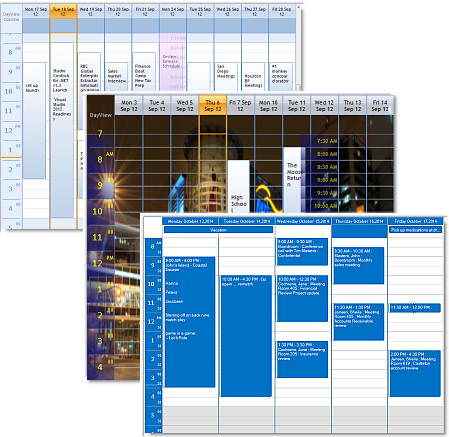
Harnessing the latest Windows styles and
themes dbi DayView offers creative
Outlook style application elegance.
Data management is a snap - Studio
Controls offers a true common data
management control (dbiPIM.dll) that
manages your data interactions for
appointments, contacts, locations and
tasks for any, one or all instances of
the Day View control being used.
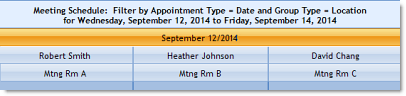
dbi Day View is an ideal
component-solution for creating an
appointment scheduler similar to that of
Microsoft Outlook with a simplified
design interface incorporating:
* Appointment scheduling
* In-line appointment editing
* Filtering and Grouping
* Direct data-management with one
data component
* Setting presentation styles once
for all instances
* Comprehensive appointment, contact,
location and task management |
|
|
|
|
  |
|
|
 |
|
|
|
|
|
|
|
|
Foundations are supporting structures
that give strength and continuity to the
presentations they support. DBI's
underlying foundation layer gives
one-point support for common visual
presentations and data structures for
each instance of the dbiDayView control. |
|
|
|
|
|
|
 Connect
your data to DBI's underlying data
manager (dbiPIM.dll) and communication
with each instance of the dbi DayView
control is now a simple reference. Connect
your data to DBI's underlying data
manager (dbiPIM.dll) and communication
with each instance of the dbi DayView
control is now a simple reference.
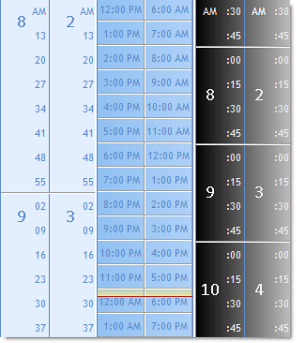
Managing and coordinating schedules is
now an easier task. dbiDayView offers
developers a flexible appointment
timeline.
Implement schedules with appointment
intervals of any increment from one
minute to 60 minutes (for example: a 7
minute interval), or a selection of 10,
15, 20 and 30 minute increments. and
across multiple time zones. Plus: |
|
|
* Schedule area time guide
* Developer defined timeline
styles and formatting
* Windows styles and themes
* Developer defined custom fill
types
* Select time presentation (AM/
PM or 24 hour clock)
* Set time position and numeric
formats within the timeline
* Present up to 31 days or
resources in a single view
* Customize presentations using
User Drawn Headers
* Work Week Presentations |
|
| |
|
|
|
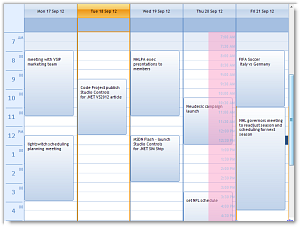
Create first impressions with dbi Day
View that will be lasting. True to DBI's
standard, we continue to provide and
extend the degree to which developers
can tweak and fine tune component
presentations, including: |
|
|
|
|
|
|
| * |
custom fill styles
cell level formatting
background images
appointment images
schedule start time
schedule end time
define schedule prime-time
define schedule non-prime time
Time select on Right Mouse click |
 |
| * |
| * |
| * |
| * |
| * |
| * |
| * |
| * |
| |
|
|
|
|
|
|
|
|
|
|
|
|
|
|
| |
|
|
|
| |
|
|
|
|