|
|
|
|
|
ActiveX
Controls
for Enterprise
Application Design |
| |
|
|
|
|
|
|
|
|
|
|
|
  |
|
|
|
|
|
| |
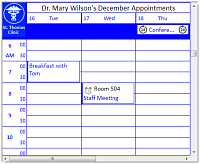
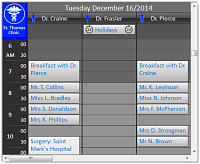
ctDayView - is an appointment
scheduling component displaying multiple
days of a schedule for a single resource
or a single day's schedule for multiple
resources. |
|
| |
|
|
| |
Appointments are easily created through
the direct edit feature of the control -
ideal for Personal Information
Management and Outlook style scheduling. |
|
| |
|
|
| |
ctDayView offers developers a powerful
data presentation, capture, and print
scheduling interface. |
|
| |
|
|
| |
|
|
| |
   |
|
| |
|
|
| |
|
|
| |
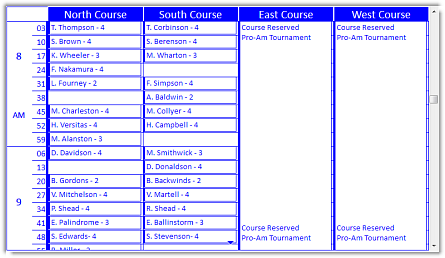
Time Segments : The
general time segments have default set
values of 5, 10, 15, 30 and 60 minutes.
The new advanced time options now allow
you to set time increments along a 1-60
minute scale. Ideal for scheduling
appointments that do no fall along a
traditional time pattern such as golf
courses. |
|
| |
|
|
| |
|
|
| |
 |
|
| |
|
|
| |
|
|
| |
Time and Column location
: The ColumnAt method and the TimeAt
method provide developers pin point
accuracy for returning the location of a
cursor or appointment within the multi
column Day View scheduling area. |
|
| |
|
|
| |
Edit Text : Edit text
directly from an appointment. Click on
the appointment to start editing the
text. A new edit option allows for
editing to stop when the "Enter" key is
pressed. This makes the control ideal
for entering a series of appointments
directly from the keyboard. Use the
arrow keys to move to the appropriate
time. Start to enter the appointment
text. Hit the "Enter" key to finish
editing and then quickly move to the
next appropriate time. |
|
| |
|
|
| |
Fill Styles : The
background of the title, header, and
time area can all be colored with
different fill styles. Just like those
found in the new GDI+ drawing routines
for .NET. including patters for
horizontal, vertical, diagonal,
horizontal bump, vertical bump, pyramid,
diamond, circular and elliptical
gradient fills. |
|
|
|
|
| |
Multiple Columns :
Display up to 35 visible columns and
store data for up to 32,000 virtual
columns. Display multiple days for a
single resource, or multiple resources
for a single day. Column images can now
be assigned "code" defined columns. |
|
| |
|
|
| |
|
|
|
Task Bar Fills : The
task bars (the colored bars down the
left side of the appointment) can be
drawn with their fill color representing
the actual time. For instance, if the
appointment is only 10 minutes long, but
the actual appointment is in a 30 minute
segment, only the first third of the
task bar will be colored. |
|
| |
|
|
| |
Appointment Conflict Management
: Includes methods and properties for
locating conflicting appointments.
Appointment area algorithms in the
control optimize screen space when
appointments conflict. |
|
| |
|
|
| |
Appointment Management Methods
: Custom methods to programmatically
add, change, and delete appointments. |
|
| |
|
|
| |
Appointment Images :
Each appointment can display up to 4
stock images (reminder, tentative,
location, and private) as well as three
custom images. |
|
| |
|
|
| |
Appointment Formatting
: define individual custom styles for
defined appointments/ appointment types
for easier viewing and visual
confirmation of schedule appointments. |
|
|
|
|
| |
Print Schedule : Custom
method prints schedule with a simple
line of code. |
|
| |
|
|
|
Print In Window : Also
supports the PrintInWindow method which
prints the contents of the current
schedule on a specific area of a page. |
|
| |
|
|
| |
Drag and Drop : Drag
and drop between columns or in and out
of component. Built-in support for drag
and drop of items between columns or
run-time drag and drop of items in to
and out of the component. |
|
| |
|
|
| |
Column Block Color :
Supports the independent coloring of
time blocks within individual columns. |
|
| |
|
|
| |
Definable Times :
Define the starting and ending time for
the schedule. Display the times in
standard or military time. |
|
| |
|
|
| |
Change Appointment Times
: Change the starting time and length of
an appointment by clicking and dragging
along the top or bottom bar of the
appointment. |
|
| |
|
|
| |
Key ID's : Key ID
values can be automatically generated
for each appointment. This makes moving
data for an appointment to and from a
database much easier. |
|
| |
|
|
| |
Multiple Time Displays
: Display multiple time areas for
different time zones. |
|
| |
|
|
| |
Image List : Store up
to 100 images in an internal image
list. |
|
| |
|
|
| |
iCalendar Support :
Allows the transfer of calendaring and
scheduling information between ctDays
and applications that support the
iCalendar specifications. |
|
| |
|
|
| |
Masked Bitmaps :
Support for masked bitmap images. |
|
| |
|
|
|
|
|
|
|
| |
|
|
|
|
| |
|
|
|
|
| |
|
|
|
|
| |
 |
|
| |
|
|
|
|
| |
|
|
|
|
| |
|
|
|
|